genfusion
收藏资源简介:
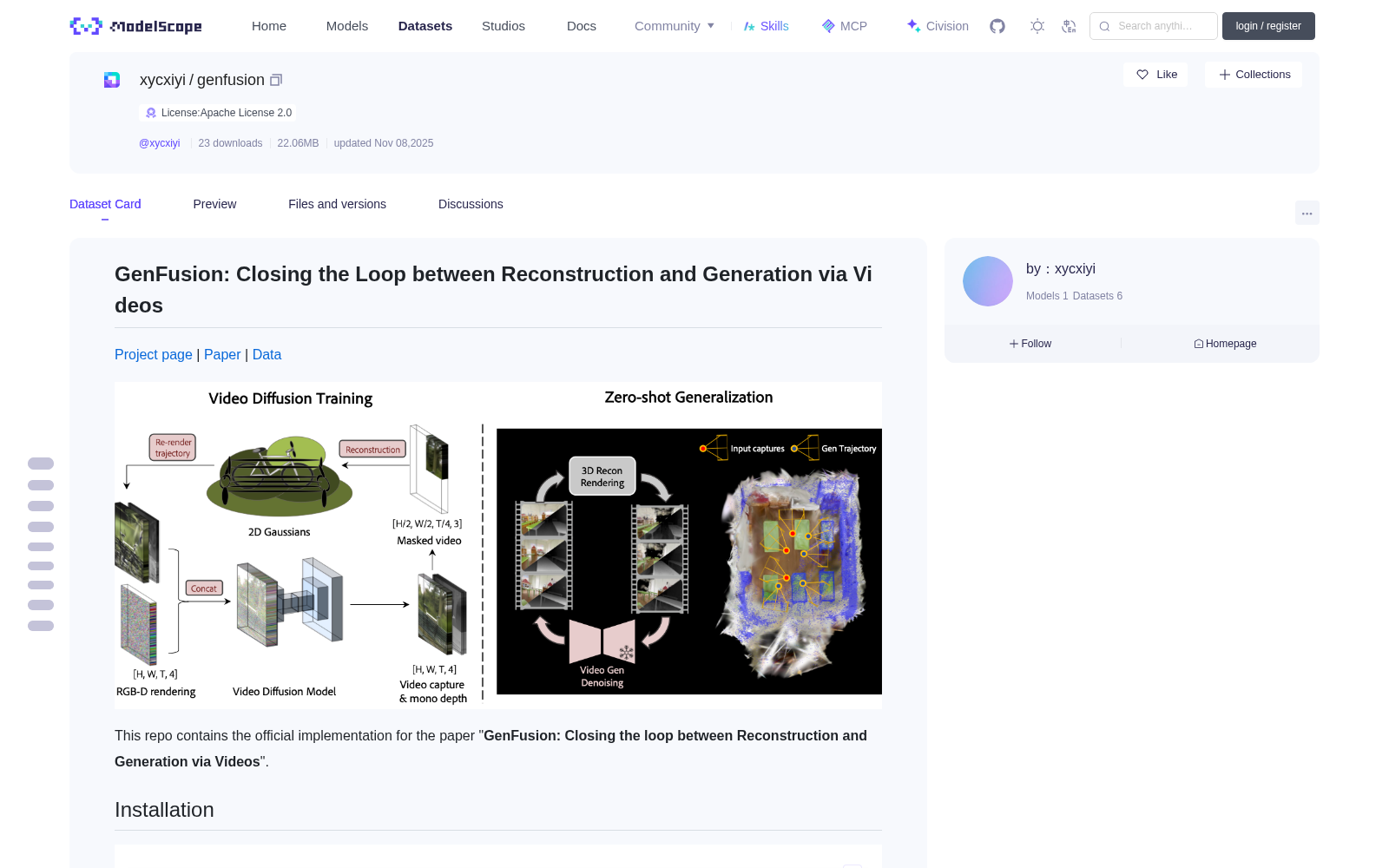
# GenFusion: Closing the Loop between Reconstruction and Generation via Videos [Project page](https://genfusion.sibowu.com) | [Paper](https://arxiv.org/abs/2503.21219) | [Data](https://huggingface.co/datasets/Inception3D/GenFusion_Training_Data) <br>  This repo contains the official implementation for the paper "**GenFusion: Closing the loop between Reconstruction and Generation via Videos**". ## Installation ```bash conda env create --file environment.yml conda activate genfusion cd Reconstruction CC=gcc-9 CXX=g++-9 pip install submodules/simple-knn CC=gcc-9 CXX=g++-9 pip install submodules/diff-surfel-rasterization ``` ## Generation Model Training The generation model is finetuned from [DynamiCrafter](https://github.com/Doubiiu/DynamiCrafter). Step 1. Download the DL3DV Renderings dataset Step 2. Download pretrained models via Hugging Face, and put the model.ckpt with the required resolution in checkpoints/dynamicrafter_512_v1/model.ckpt. Step 3. Run the following command to start training on a resolution of 512x320. ```bash cd ./GenerationModel sh configs/training_video_v1.0/run_interp.sh ``` Step 4. Finetuned the model on a higher resolution of 960x512. ```bash sh configs/training_960_v1.0/run_interp.sh ``` If you want to use the model for generation inference, you can download our pre-trained model from [here](https://huggingface.co/Sibo2rr/GenFusion-GenerationModel). ## Reconstruction If your skip the generation model training, you can download our pre-trained model from [here](https://huggingface.co/Sibo2rr/GenFusion-GenerationModel) and put it in the `./diffusion_ckpt` folder ### Masked 3D Reconstruction Step 1. The testing scenes in our paper is selected from DL3DV Benchmarkand DL3DV dataset. Download scenes from [Huggingface](https://huggingface.co/datasets/Inception3D/GenFusion_DL3DV_24Benchmark) and put them in the `./data` folder. Step 2. To get the quantitative results in our paper, you can run the following command. ```bash cd ./Reconstruction python genfusion_scripts/batch_ours.py [gpu_ids] ``` To run a masked 3D reconstruction on your own scene, you can use the following command. ```bash cd ./Reconstruction python train.py --data_dir [data_dir] \ -m [output_dir] \ --iterations 7_000 \ --test_iterations 7_000 \ --diffusion_ckpt ./diffusion_ckpt/epoch=59-step=34000.ckpt \ --diffusion_config ./generation_infer.yaml \ --num_frames 16 \ --outpaint_type crop \ --start_diffusion_iter 3000 \ --sparse_view 0 \ --downsample_factor 2 \ --diffusion_resize_width 960 \ --diffusion_resize_height 512 \ --diffusion_crop_width 960 \ --diffusion_crop_height 512 \ --patch_size [crop_width] [crop_height] \ # we recommend to use half of the image resolution --opacity_reset_interval 9000 \ --lambda_dist 0.0 \ --lambda_reg 0.5 \ --lambda_dssim 0.8 \ --densify_from_iter 1000 \ --unconditional_guidance_scale 3.2 \ --repair ``` ### Sparse view Reconstruction Step 1. Download the Mip-NeRF data and train/test split from [ReconFusion](https://drive.google.com/drive/folders/10oT2_OQ9Sjh5wlfJQoGx2y7ZKYwpgNg5) Step 2. Run the following command to start training. ```bash cd ./Reconstruction python genfusion_scripts/batch_sparse.py [gpu_ids] ``` To run a sparse view reconstruction on your own scene, a `train_test_split_{sparse_view}.json` file is required in the following format: ```json { "test_ids": [ 0, 8, 12, ... ], "train_ids": [ 1, 2, 3, ... ] } ``` Then run the following command: ```bash python train.py \ --data_dir [data_dir] -m [output_dir] \ --iterations 7000 \ --test_iterations 7_000 \ --diffusion_ckpt ./diffusion_ckpt/epoch=59-step=34000.ckpt \ --diffusion_config ./generation_infer.yaml \ --num_frames 16 \ --outpaint_type sparse \ --start_diffusion_iter 1000 \ --sparse_view [num_of_sparse_views] \ --diffusion_resize_width 960 \ --diffusion_resize_height 512 \ --diffusion_crop_width 960 \ --diffusion_crop_height 512 \ --mono_depth \ --repair \ --densify_from_iter 100 \ --diffusion_until 7000 \ --diffusion_every 1000 \ --densify_until_iter 5000 \ --densification_interval 500 \ --opacity_reset_interval 3100 \ --lambda_dist 10.0 \ --lambda_dssim 0.5 \ --lambda_reg 1.0 \ --unconditional_guidance_scale 3.2 ``` ### Scene Completion We provide two options to reconstruct the unseen area of the scene. - Option 1: Pre-defined camera path using [RemoteViewer](https://github.com/hwanhuh/2D-GS-Viser-Viewer), save the trajectory as a json file. Use counter scene in Mip-NeRF360 as an example: ```bash python train.py \ --data_dir [data_dir] \ -m output_ours/counter_completion \ --test_iterations 7_000 \ --diffusion_ckpt ./diffusion_ckpt/epoch=59-step=34000.ckpt \ --diffusion_config ./generation_infer.yaml \ --num_frames 16 \ --outpaint_type rotation \ --add_indices 7 15 \ --depth_loss \ --iterations 26000 \ --diffusion_resize_width 960 \ --diffusion_resize_height 512 \ --diffusion_crop_width 960 \ --diffusion_crop_height 512 \ --repair \ --port 6678 \ --densify_from_iter 500 \ --densify_until_iter 12000 \ --diffusion_until 30000 \ --start_diffusion_iter 5000 \ --diffusion_every 4000 \ --opacity_reset_interval 15000 \ --unconditional_guidance_scale 2.2 \ --start_dist_iter 3000 \ --camera_path_file [trajectory file] ``` - Option 2: Use path paramters in the script to determine the shape of sampling path. ```bash python train.py \ --data_dir [data_dir] \ -m [output_dir] \ --test_iterations 7_000 \ --diffusion_ckpt ./diffusion_ckpt/epoch=59-step=34000.ckpt \ --diffusion_config ./generation_infer.yaml \ --num_frames 16 \ --outpaint_type rotation \ --add_indices 7 15 \ --depth_loss \ --iterations 26000 \ --diffusion_resize_width 960 \ --diffusion_resize_height 512 \ --diffusion_crop_width 960 \ --diffusion_crop_height 512 \ --port 6691 \ --densify_from_iter 500 \ --densify_until_iter 12000 \ --diffusion_until 30000 \ --start_diffusion_iter 5000 \ --diffusion_every 4000 \ --opacity_reset_interval 15000 \ --repair \ # define the following parameters for your own scene --path_scale 1.0 \ --rotation_angle 90 \ --position_z_offset 0.5 \ --distance -0.2 \ --unconditional_guidance_scale 2.2 \ --start_dist_iter 3000 ``` ## Citation If you find this work useful in your research, please consider citing: ```bibtex @inproceedings{Wu2025GenFusion, author = {Sibo Wu and Congrong Xu and Binbin Huang and Geiger Andreas and Anpei Chen}, title = {GenFusion: Closing the Loop between Reconstruction and Generation via Videos}, booktitle = {Conference on Computer Vision and Pattern Recognition (CVPR)}, year = {2025} } ``` ## Acknowledgements This project is built upon [2DGS](https://github.com/hbb1/2d-gaussian-splatting) and [DynamiCrafter](https://github.com/Doubiiu/DynamiCrafter). The dataset processing is based on [gsplat](https://github.com/nerfstudio-project/gsplat/tree/main/gsplat). We thank all the authors for their great repos. Special thanks to [LiangrunDa](https://github.com/LiangrunDa) for his help on the project website and part of the code.
# GenFusion:通过视频实现重建与生成的闭环 [项目页面](https://genfusion.sibowu.com) | [论文](https://arxiv.org/abs/2503.21219) | [数据集](https://huggingface.co/datasets/Inception3D/GenFusion_Training_Data) <br>  本仓库包含论文《GenFusion:通过视频实现重建与生成的闭环》的官方实现代码。 ## 安装环境 bash conda env create --file environment.yml conda activate genfusion cd Reconstruction CC=gcc-9 CXX=g++-9 pip install submodules/simple-knn CC=gcc-9 CXX=g++-9 pip install submodules/diff-surfel-rasterization ## 生成模型训练 本生成模型基于[DynamiCrafter](https://github.com/Doubiiu/DynamiCrafter)进行微调。 步骤1:下载DL3DV渲染数据集 步骤2:通过Hugging Face下载预训练模型,并将对应分辨率的model.ckpt放置于checkpoints/dynamicrafter_512_v1/model.ckpt路径下。 步骤3:运行以下命令,以512x320分辨率启动训练: bash cd ./GenerationModel sh configs/training_video_v1.0/run_interp.sh 步骤4:以960x512更高分辨率对模型进行微调: bash sh configs/training_960_v1.0/run_interp.sh 若需使用该模型执行生成推理,可从[此处](https://huggingface.co/Sibo2rr/GenFusion-GenerationModel)下载我们的预训练模型。 ## 重建模块 若您跳过生成模型训练环节,可从上述链接下载预训练模型,并放置于`./diffusion_ckpt`文件夹中。 ### 遮罩式3D重建 步骤1:本文中的测试场景选自DL3DV基准测试集与DL3DV数据集,请从[Huggingface](https://huggingface.co/datasets/Inception3D/GenFusion_DL3DV_24Benchmark)下载场景文件,并放置于`./data`文件夹中。 步骤2:若需复现论文中的定量结果,可运行以下命令: bash cd ./Reconstruction python genfusion_scripts/batch_ours.py [gpu_ids] 若需在自定义场景上执行遮罩式3D重建,可使用以下命令: bash cd ./Reconstruction python train.py --data_dir [data_dir] -m [output_dir] --iterations 7_000 --test_iterations 7_000 --diffusion_ckpt ./diffusion_ckpt/epoch=59-step=34000.ckpt --diffusion_config ./generation_infer.yaml --num_frames 16 --outpaint_type crop --start_diffusion_iter 3000 --sparse_view 0 --downsample_factor 2 --diffusion_resize_width 960 --diffusion_resize_height 512 --diffusion_crop_width 960 --diffusion_crop_height 512 --patch_size [crop_width] [crop_height] # 建议使用图像分辨率的一半 --opacity_reset_interval 9000 --lambda_dist 0.0 --lambda_reg 0.5 --lambda_dssim 0.8 --densify_from_iter 1000 --unconditional_guidance_scale 3.2 --repair ### 稀疏视角重建 步骤1:从[ReconFusion](https://drive.google.com/drive/folders/10oT2_OQ9Sjh5wlfJQoGx2y7ZKYwpgNg5)下载Mip-NeRF数据集与训练/测试划分集。 步骤2:运行以下命令启动训练: bash cd ./Reconstruction python genfusion_scripts/batch_sparse.py [gpu_ids] 若需在自定义场景上执行稀疏视角重建,需提供格式如下的`train_test_split_{sparse_view}.json`文件: json { "test_ids": [ 0, 8, 12, ... ], "train_ids": [ 1, 2, 3, ... ] } 随后运行以下命令: bash python train.py --data_dir [data_dir] -m [output_dir] --iterations 7000 --test_iterations 7_000 --diffusion_ckpt ./diffusion_ckpt/epoch=59-step=34000.ckpt --diffusion_config ./generation_infer.yaml --num_frames 16 --outpaint_type sparse --start_diffusion_iter 1000 --sparse_view [num_of_sparse_views] --diffusion_resize_width 960 --diffusion_resize_height 512 --diffusion_crop_width 960 --diffusion_crop_height 512 --mono_depth --repair --densify_from_iter 100 --diffusion_until 7000 --diffusion_every 1000 --densify_until_iter 5000 --densification_interval 500 --opacity_reset_interval 3100 --lambda_dist 10.0 --lambda_dssim 0.5 --lambda_reg 1.0 --unconditional_guidance_scale 3.2 ### 场景补全 我们提供两种方案以重建场景的未观测区域。 - 方案1:使用[RemoteViewer](https://github.com/hwanhuh/2D-GS-Viser-Viewer)定义相机路径,并将轨迹保存为json文件,以Mip-NeRF360中的counter场景为例: bash python train.py --data_dir [data_dir] -m output_ours/counter_completion --test_iterations 7_000 --diffusion_ckpt ./diffusion_ckpt/epoch=59-step=34000.ckpt --diffusion_config ./generation_infer.yaml --num_frames 16 --outpaint_type rotation --add_indices 7 15 --depth_loss --iterations 26000 --diffusion_resize_width 960 --diffusion_resize_height 512 --diffusion_crop_width 960 --diffusion_crop_height 512 --repair --port 6678 --densify_from_iter 500 --densify_until_iter 12000 --diffusion_until 30000 --start_diffusion_iter 5000 --diffusion_every 4000 --opacity_reset_interval 15000 --unconditional_guidance_scale 2.2 --start_dist_iter 3000 --camera_path_file [trajectory file] - 方案2:通过脚本中的路径参数确定采样路径的形状: bash python train.py --data_dir [data_dir] -m [output_dir] --test_iterations 7_000 --diffusion_ckpt ./diffusion_ckpt/epoch=59-step=34000.ckpt --diffusion_config ./generation_infer.yaml --num_frames 16 --outpaint_type rotation --add_indices 7 15 --depth_loss --iterations 26000 --diffusion_resize_width 960 --diffusion_resize_height 512 --diffusion_crop_width 960 --diffusion_crop_height 512 --port 6691 --densify_from_iter 500 --densify_until_iter 12000 --diffusion_until 30000 --start_diffusion_iter 5000 --diffusion_every 4000 --opacity_reset_interval 15000 --repair # 为自定义场景配置以下参数 --path_scale 1.0 --rotation_angle 90 --position_z_offset 0.5 --distance -0.2 --unconditional_guidance_scale 2.2 --start_dist_iter 3000 ## 引用 若本工作对您的研究有所助益,请引用如下文献: bibtex @inproceedings{Wu2025GenFusion, author = {Sibo Wu and Congrong Xu and Binbin Huang and Geiger Andreas and Anpei Chen}, title = {GenFusion: Closing the Loop between Reconstruction and Generation via Videos}, booktitle = {Conference on Computer Vision and Pattern Recognition (CVPR)}, year = {2025} } ## 致谢 本项目基于[2DGS](https://github.com/hbb1/2d-gaussian-splatting)与[DynamiCrafter](https://github.com/Doubiiu/DynamiCrafter)开发,数据集处理基于[gsplat](https://github.com/nerfstudio-project/gsplat/tree/main/gsplat)实现,谨向上述开源仓库的作者致以诚挚谢意。 特别感谢[LiangrunDa](https://github.com/LiangrunDa)为本项目网站与部分代码提供的帮助。