
GRScenes
收藏魔搭社区2026-05-16 更新2025-02-22 收录
下载链接:
https://modelscope.cn/datasets/Shanghai_AI_Laboratory/GRScenes
下载链接
链接失效反馈官方服务:
资源简介:
## 🏙️ GRScenes Data

### ✨ Features
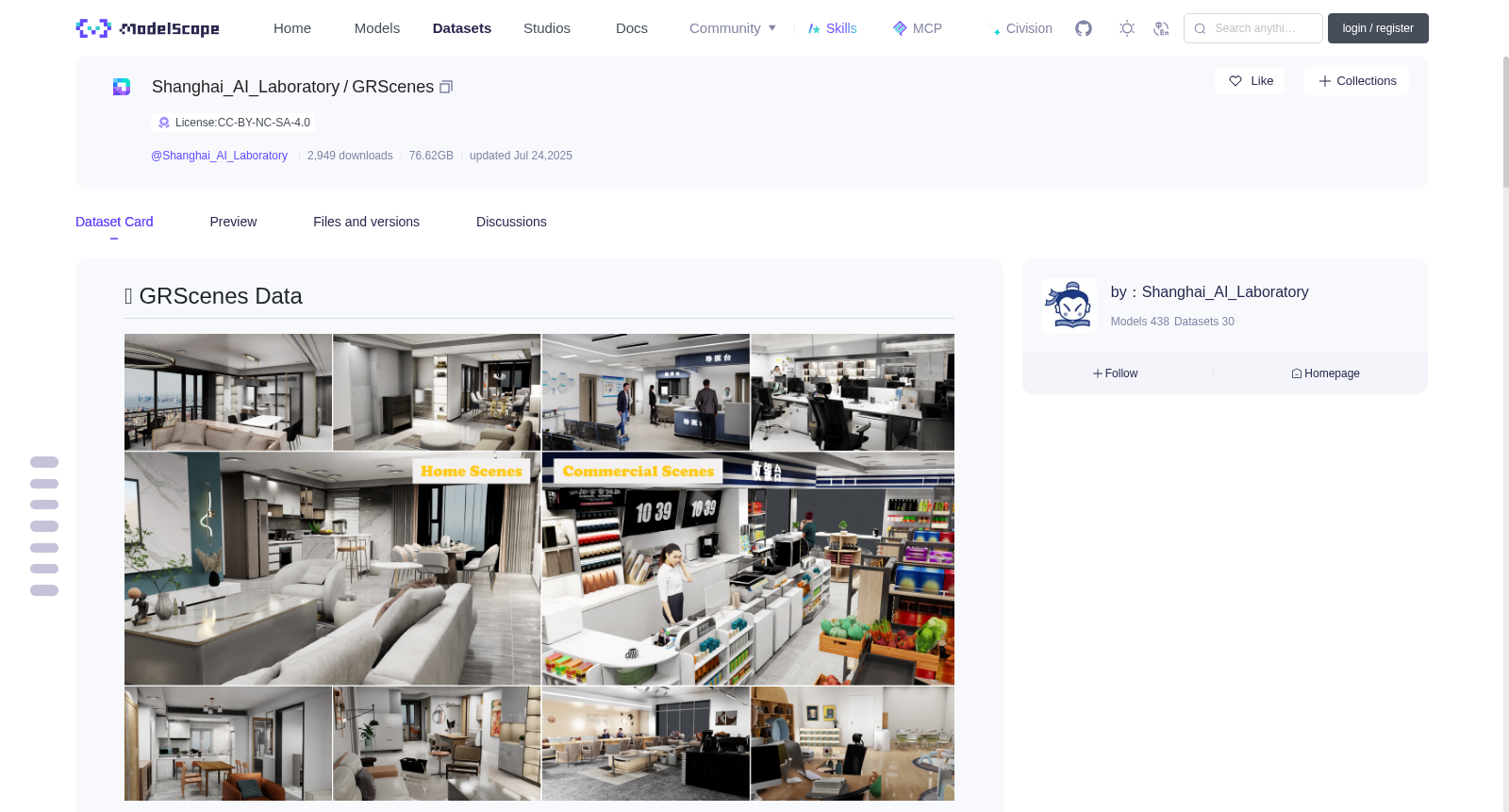
1. **Large-Scale & Dynamic & Realistic**: GRScenes is built from over 100k high-quality scene prototypes and now includes 99 environments (69 home scenes and 30 commercial scenes). Each scene has been carefully designed and accurately modeled to ensure realism.
2. **Fine-grained Interactive Objects**: All the objects have full internal modeling, enabling robots to perform actions such as opening doors or sliding drawers in a realistic way. These assets facilitate fine-grained manipulation tasks and include part-level annotations in Omniverse X-form level.
3. **Rich Semantic Information**: We set object-level semantic labels in each scene, which support tasks such as local navigation and object searching.
### 📁 Directory Structure
```
GRScenes-100/commercial_scenes.zip --(unzip)--> target_30_new
└── ...
GRScenes-100/home_scenes.zip --(unzip)--> target_69_new
├── Materials
│ └── ... (material mdl files and texture pictures)
├── models
│ ├── layout
│ │ ├── articulated
│ │ │ └── ... ( window, door, etc.)
│ │ └── others
│ │ └── ... (ceiling, wall, ground, etc.)
│ └── object
│ ├── articulated
│ │ └── ... (microwave, refrigerator, etc.)
│ └── others
│ └── ... (bed, bottle, cup, etc.)
└── scenes
├── MV7J6NIKTKJZ2AABAAAAADA8_usd
│ ├── Materials -> ../../Materials
│ ├── models -> ../../models
│ ├── metadata.json (records the referenced model and material paths)
│ └── start_result_xxx.usd (scene usd files)
└── ... (other scene folders)
```
- **Materials** folder contains mdl files and texture pictures. The mdl files, which are Material Definition Language files commonly used by rendering engines such as NVIDIA Omniverse. These mdl files are used with texture pictures to define the physically based material properties such as color, reflectivity, and transparency that can be applied to 3D objects.
- **models** folder contains 3D object models, where layouts objects under `layout/` and interactive objects under `object/`. Subdirectories are further categorized according to the model semantic labels such as `door` and `oven`.
- **scenes** folder (e.g., `MV7J6NIKTKJZ2AABAAAAADA8_usd/`) contains the following files:
- **Scene USD Files**
We provides three usd files.
- **raw scene**, named as `start_result_raw.usd`, which defines the layout of the scene.
- **navigation scene**, named as `start_result_navigation.usd`, which used for navigation tasks.
- **interaction scene**, named as `start_result_interaction.usd`, which used for manipulation tasks.
- **metadata.json**
This file records the metadata information of the models and materials referenced in the raw scene.
- **interactive_obj_list.json**
This file records the prim paths of the interactive objects in the interaction scene.
## 📚 Getting Started
### Prerequisites
**Configure MDL Material Search Path**
If loading scenes in Isaac Sim, we recommend to configure an environment variable named `MDL_SYSTEM_PATH` according to this [doc](https://docs.omniverse.nvidia.com/materials-and-rendering/latest/mdl_search_path.html). Here are the steps:
```bash
# step 1. Find the Materials folder path, such as `./target_69_new/Materials`
# step 2. Configure the environment variable `MDL_SYSTEM_PATH` (saved to `~/.bashrc` is recommended).
echo 'export MDL_SYSTEM_PATH=$MDL_SYSTEM_PATH:</path/to/your_downloaded_materials_folder>' >> ~/.bashrc
source ~/.bashrc
```
**Install Dependencies**
Our tool scripts depends on OpenUSD and IsaacSim Python SDK, users need to install these dependencies as follows:
```bash
conda create -n <env_name> python=3.10
conda activate <env_name>
pip install usd-core==24.11
pip install isaacsim==4.2.0.2 isaacsim-extscache-physics==4.2.0.2 isaacsim-extscache-kit==4.2.0.2 isaacsim-extscache-kit-sdk==4.2.0.2 --extra-index-url https://pypi.nvidia.com
```
### Usage
We provide some [scripts](https://github.com/OpenRobotLab/GRUtopia/tree/main/toolkits/grscenes_scripts) for GRScenes.
- **preprocess.py** is used to bind physics properties (rigid body, collider etc.) with objects in one or several scenes.
```bash
## use `-i/--interaction` option to preprocess scenes for interaction.
python preprocess.py -i/--interaction -f/--files [</path/to/raw_scene_usd_file>...]
## use `-n/--navigation` option to preprocess scenes for navigation
python preprocess.py -n/--navigation -f/--files [</path/to/raw_scene_usd_file>...]
## besides, use `-d/--dirs` option to preprocess all scenes under the scenes folder such as `/ssd/$USER/target_69_new/scenes`
python preprocess.py -i/--interaction -n/--navigation -d/--dirs [</path/to/scene_root_folder>...]
```
- **warmup.py** is used to warmup the simulation process of the given scenes.
```bash
## warmup the specific scenes
python warmup.py -f/--files [</path/to/scene_usd_file>...]
## warmup all scenes
python warmup.py -d/--dirs [</path/to/scene_root_folder>...]
```
- **play_scene.py** is used to load and play the given scene.
```shell
python play_scene.py -f/--file </path/to/scene_usd_file>
```
- **export_scenes.py** is used to export the specified one or more scenes with its related objects and material files.
```bash
python export_scenes.py -i/--input </path/to/source_scene_root_folder> -o/--output </path/to/target_scene_root_folder> -n/--names [<scene_id1>...]
```
- **get_metadata.py** is used to get the metadata information of the models and materials referenced in given model instance or scene usd files.
```bash
python get_metadata.py -f/--files [</path/to/single_instance_or_scene_usd>...]
python get_metadata.py -d/--dirs [</path/to/instance_or_scene_root_folder>...]
```
- **extract_objaverse.py** is used to extract model objects from objaverse. It can convert the data type of 3D models from glb format to usd format, and detach the raw models and its materials.
```bash
python extract_objaverse.py --usd_path </path/to/objavers_usd_file> --material_path </path/to/output_material_files_path>
```
</details>
## 📄 License
GRUtopia's simulation platform is [MIT licensed](LICENSE). The open-sourced GRScenes are under the <a rel="license" href="http://creativecommons.org/licenses/by-nc-sa/4.0/">Creative Commons Attribution-NonCommercial-ShareAlike 4.0 International License </a><a rel="license" href="http://creativecommons.org/licenses/by-nc-sa/4.0/"><img alt="Creative Commons License" style="border-width:0" src="https://i.creativecommons.org/l/by-nc-sa/4.0/80x15.png" /></a>.
🏙️ GRScenes 数据集

### ✨ 数据集特性
1. **大规模、动态且高度写实**:GRScenes 基于超过10万个高质量场景原型构建,目前包含99个仿真环境(其中69个居家场景,30个商用场景)。每个场景均经过精心设计与精准建模,确保视觉效果高度拟真。
2. **细粒度交互物体**:所有物体均具备完整的内部建模,支持机器人以拟真方式执行开门、滑动抽屉等操作。此类资产可支撑细粒度操控任务,并在Omniverse X-form层级中包含部件级标注。
3. **丰富语义信息**:我们为每个场景添加了物体级语义标签,可支持局部导航、物体搜索等相关任务。
### 📁 目录结构
GRScenes-100/commercial_scenes.zip --(解压后)--> target_30_new
└── ...
GRScenes-100/home_scenes.zip --(解压后)--> target_69_new
├── Materials
│ └── ... (材质mdl文件与纹理图片)
├── models
│ ├── layout
│ │ ├── articulated
│ │ │ └── ... ( 门窗等可交互物体 )
│ │ └── others
│ │ └── ... (天花板、墙面、地面等静态物体 )
│ └── object
│ ├── articulated
│ │ └── ... (微波炉、冰箱等可交互物体 )
│ └── others
│ └── ... (床、水瓶、杯子等静态物体 )
└── scenes
├── MV7J6NIKTKJZ2AABAAAAADA8_usd
│ ├── Materials -> ../../Materials
│ ├── models -> ../../models
│ ├── metadata.json (记录引用的模型与材质路径)
│ └── start_result_xxx.usd (场景USD文件)
└── ... (其他场景文件夹)
- **Materials 文件夹**:包含mdl(Material Definition Language,材质定义语言)文件与纹理图片。mdl是NVIDIA Omniverse等渲染引擎常用的材质定义语言文件格式,配合纹理图片可定义应用于3D物体的基于物理的材质属性,包括颜色、反射率与透明度等。
- **models 文件夹**:包含3D物体模型,其中`layout/`目录下为场景布局物体,`object/`目录下为可交互物体。子目录进一步按照`door`(门)、`oven`(烤箱)等模型语义标签进行分类。
- **scenes 文件夹**(例如`MV7J6NIKTKJZ2AABAAAAADA8_usd/`)包含以下文件:
- **场景USD(Universal Scene Description,通用场景描述)文件**
我们提供三种USD文件:
- **原始场景文件**:命名为`start_result_raw.usd`,用于定义场景基础布局。
- **导航场景文件**:命名为`start_result_navigation.usd`,用于导航任务场景。
- **交互场景文件**:命名为`start_result_interaction.usd`,用于物体操控任务场景。
- **metadata.json**
该文件记录了原始场景中引用的模型与材质的元数据信息。
- **interactive_obj_list.json**
该文件记录了交互场景中所有可交互物体的Prim路径。
### 📚 快速上手
#### 前置准备
##### 配置MDL材质搜索路径
若在Isaac Sim中加载场景,我们建议根据该[官方文档](https://docs.omniverse.nvidia.com/materials-and-rendering/latest/mdl_search_path.html)配置名为`MDL_SYSTEM_PATH`的环境变量,具体步骤如下:
bash
# 步骤1. 找到Materials文件夹的绝对路径,例如`./target_69_new/Materials`
# 步骤2. 配置环境变量`MDL_SYSTEM_PATH`(建议写入`~/.bashrc`以永久生效)。
echo 'export MDL_SYSTEM_PATH=$MDL_SYSTEM_PATH:</path/to/your_downloaded_materials_folder>' >> ~/.bashrc
source ~/.bashrc
##### 安装依赖项
我们的工具脚本依赖OpenUSD与IsaacSim Python SDK,用户需按以下流程安装所需依赖:
bash
conda create -n <env_name> python=3.10
conda activate <env_name>
pip install usd-core==24.11
pip install isaacsim==4.2.0.2 isaacsim-extscache-physics==4.2.0.2 isaacsim-extscache-kit==4.2.0.2 isaacsim-extscache-kit-sdk==4.2.0.2 --extra-index-url https://pypi.nvidia.com
#### 使用方法
我们为GRScenes提供了一系列[配套工具脚本](https://github.com/OpenRobotLab/GRUtopia/tree/main/toolkits/grscenes_scripts):
- **preprocess.py**:用于为一个或多个场景中的物体绑定物理属性(刚体、碰撞体等)。
bash
## 使用`-i/--interaction`选项预处理交互任务场景
python preprocess.py -i/--interaction -f/--files [</path/to/raw_scene_usd_file>...]
## 使用`-n/--navigation`选项预处理导航任务场景
python preprocess.py -n/--navigation -f/--files [</path/to/raw_scene_usd_file>...]
## 此外,使用`-d/--dirs`选项可批量预处理指定场景根文件夹(如`/ssd/$USER/target_69_new/scenes`)下的所有场景
python preprocess.py -i/--interaction -n/--navigation -d/--dirs [</path/to/scene_root_folder>...]
- **warmup.py**:用于预热指定场景的仿真流程,提升后续仿真运行效率。
bash
## 预热指定单个或多个场景
python warmup.py -f/--files [</path/to/scene_usd_file>...]
## 批量预热指定根文件夹下的所有场景
python warmup.py -d/--dirs [</path/to/scene_root_folder>...]
- **play_scene.py**:用于加载并播放指定场景,快速预览场景效果。
shell
python play_scene.py -f/--file </path/to/scene_usd_file>
- **export_scenes.py**:用于导出指定的一个或多个场景及其关联的物体与材质文件,方便场景迁移与分发。
bash
python export_scenes.py -i/--input </path/to/source_scene_root_folder> -o/--output </path/to/target_scene_root_folder> -n/--names [<scene_id1>...]
- **get_metadata.py**:用于获取指定模型实例或场景USD文件中引用的模型与材质的元数据信息。
bash
python get_metadata.py -f/--files [</path/to/single_instance_or_scene_usd>...]
python get_metadata.py -d/--dirs [</path/to/instance_or_scene_root_folder>...]
- **extract_objaverse.py**:用于从Objaverse开放3D模型数据集提取模型物体,可将3D模型格式从glb转换为usd,并分离原始模型与其材质文件。
bash
python extract_objaverse.py --usd_path </path/to/objaverse_usd_file> --material_path </path/to/output_material_files_path>
## 📄 许可证
GRUtopia的仿真平台采用[MIT开源许可证](LICENSE)。开源发布的GRScenes数据集遵循<a rel="license" href="http://creativecommons.org/licenses/by-nc-sa/4.0/">知识共享署名-非商业性使用-相同方式共享 4.0 国际许可协议</a><a rel="license" href="http://creativecommons.org/licenses/by-nc-sa/4.0/"><img alt="知识共享许可协议" style="border-width:0" src="https://i.creativecommons.org/l/by-nc-sa/4.0/80x15.png" /></a>。
提供机构:
maas
创建时间:
2025-02-17
搜集汇总
数据集介绍
背景与挑战
背景概述
GRScenes是一个包含99个高质量3D场景的数据集(69个家庭场景和30个商业场景),具有精细的交互对象建模和丰富的语义标签,适用于机器人导航和操作任务。数据集提供了多种USD文件和详细的元数据,支持物理模拟和材料定义。
以上内容由遇见数据集搜集并总结生成



