
LanguageBind/MoE-LLaVA
收藏Hugging Face2024-02-15 更新2024-03-04 收录
下载链接:
https://hf-mirror.com/datasets/LanguageBind/MoE-LLaVA
下载链接
链接失效反馈官方服务:
资源简介:
---
license: apache-2.0
---
<p align="center">
<img src="https://s11.ax1x.com/2023/12/28/piqvDMV.png" width="250" style="margin-bottom: 0.2;"/>
<p>
<h2 align="center"> <a href="https://arxiv.org/abs/2401.15947">MoE-LLaVA: Mixture of Experts for Large Vision-Language Models</a></h2>
<h5 align="center"> If you like our project, please give us a star ⭐ on GitHub for latest update. </h2>
<h5 align="center">
</h5>
## 📰 News
* **[2024.01.30]** The [paper](https://arxiv.org/abs/2401.15947) is released.
* **[2024.01.27]** 🤗[Hugging Face demo](https://huggingface.co/spaces/LanguageBind/MoE-LLaVA) and **all codes & datasets** are available now! Welcome to **watch** 👀 this repository for the latest updates.
## 😮 Highlights
MoE-LLaVA shows excellent performance in multi-modal learning.
### 🔥 High performance, but with fewer parameters
- with just **3B sparsely activated parameters**, MoE-LLaVA demonstrates performance comparable to the LLaVA-1.5-7B on various visual understanding datasets and even surpasses the LLaVA-1.5-13B in object hallucination benchmarks.
### 🚀 Simple baseline, learning multi-modal interactions with sparse pathways.
- With the addition of **a simple MoE tuning stage**, we can complete the training of MoE-LLaVA on **8 V100 GPUs** within 2 days.
## 🤗 Demo
### Gradio Web UI
Highly recommend trying out our web demo by the following command, which incorporates all features currently supported by MoE-LLaVA. We also provide [online demo](https://huggingface.co/spaces/LanguageBind/MoE-LLaVA) in Huggingface Spaces.
```bash
# use phi2
deepspeed --include localhost:0 moellava/serve/gradio_web_server.py --model-path "LanguageBind/MoE-LLaVA-Phi2-2.7B-4e"
# use qwen
deepspeed --include localhost:0 moellava/serve/gradio_web_server.py --model-path "LanguageBind/MoE-LLaVA-Qwen-1.8B-4e"
# use stablelm
deepspeed --include localhost:0 moellava/serve/gradio_web_server.py --model-path "LanguageBind/MoE-LLaVA-StableLM-1.6B-4e"
```
### CLI Inference
```bash
# use phi2
deepspeed --include localhost:0 moellava/serve/cli.py --model-path "LanguageBind/MoE-LLaVA-Phi2-2.7B-4e" --image-file "image.jpg"
# use qwen
deepspeed --include localhost:0 moellava/serve/cli.py --model-path "LanguageBind/MoE-LLaVA-Qwen-1.8B-4e" --image-file "image.jpg"
# use stablelm
deepspeed --include localhost:0 moellava/serve/cli.py --model-path "LanguageBind/MoE-LLaVA-StableLM-1.6B-4e" --image-file "image.jpg"
```
## 🐳 Model Zoo
| Model | LLM | Checkpoint | Avg | VQAv2 | GQA | VizWiz | SQA | T-VQA | POPE | MM-Bench| LLaVA-Bench-Wild | MM-Vet |
|----------|-----------|-----------|---|---|---|---|---|---|---|---|---|---|
| MoE-LLaVA-1.6B×4-Top2 | 1.6B | [LanguageBind/MoE-LLaVA-StableLM-1.6B-4e](https://huggingface.co/LanguageBind/MoE-LLaVA-StableLM-1.6B-4e) | 60.0 | 76.0 | 60.4 | 37.2 | 62.6 | 47.8 | 84.3 | 59.4 | 85.9 | 26.1 |
| MoE-LLaVA-1.8B×4-Top2 | 1.8B | [LanguageBind/MoE-LLaVA-Qwen-1.8B-4e](https://huggingface.co/LanguageBind/MoE-LLaVA-Qwen-1.8B-4e) | 60.2 | 76.2 | 61.5 | 32.6 | 63.1 | 48.0 | 87.0 | 59.6 | 88.7 | 25.3 |
| MoE-LLaVA-2.7B×4-Top2 | 2.7B | [LanguageBind/MoE-LLaVA-Phi2-2.7B-4e](https://huggingface.co/LanguageBind/MoE-LLaVA-Phi2-2.7B-4e) | 63.9 | 77.1 | 61.1 | 43.4 | 68.7 | 50.2 | 85.0 | 65.5 | 93.2 | 31.1 |
<!--
| LLaVA-1.5 | 7B | [liuhaotian/llava-v1.5-7b](https://huggingface.co/liuhaotian/llava-v1.5-7b) | 62.0 | 78.5 | 62.0 | 50.0 | 66.8 | 58.2 | 85.9 | 64.3 | 31.1 |
| LLaVA-1.5 | 13B | [liuhaotian/llava-v1.5-13b](https://huggingface.co/liuhaotian/llava-v1.5-13b) | 64.9 | 80.0 | 63.3 | 53.6 | 71.6 | 61.3 | 85.9 | 67.7 | 36.1 |
-->
## ⚙️ Requirements and Installation
* Python >= 3.10
* Pytorch == 2.0.1
* CUDA Version >= 11.7
* **Transformers == 4.36.2**
* **Tokenizers==0.15.1**
* Install required packages:
```bash
git clone https://github.com/PKU-YuanGroup/MoE-LLaVA
cd MoE-LLaVA
conda create -n moellava python=3.10 -y
conda activate moellava
pip install --upgrade pip # enable PEP 660 support
pip install -e .
pip install -e ".[train]"
pip install flash-attn --no-build-isolation
# Below are optional. For Qwen model.
git clone https://github.com/Dao-AILab/flash-attention
cd flash-attention && pip install .
# Below are optional. Installing them might be slow.
# pip install csrc/layer_norm
# If the version of flash-attn is higher than 2.1.1, the following is not needed.
# pip install csrc/rotary
```
## 🗝️ Training & Validating
The training & validating instruction is in [TRAIN.md](docs/TRAIN.md) & [EVAL.md](docs/EVAL.md).
## 💡 Customizing your MoE-LLaVA
The instruction is in [CUSTOM.md](docs/CUSTOM.md).
## 😍 Visualization
The instruction is in [VISUALIZATION.md](docs/VISUALIZATION.md).
## 🤖 API
**We open source all codes.** If you want to load the model (e.g. ```LanguageBind/MoE-LLaVA```) on local, you can use the following code snippets.
**Using the following command to run the code.**
```bash
deepspeed predict.py
```
```python
import torch
from moellava.constants import IMAGE_TOKEN_INDEX, DEFAULT_IMAGE_TOKEN
from moellava.conversation import conv_templates, SeparatorStyle
from moellava.model.builder import load_pretrained_model
from moellava.utils import disable_torch_init
from moellava.mm_utils import tokenizer_image_token, get_model_name_from_path, KeywordsStoppingCriteria
def main():
disable_torch_init()
image = 'moellava/serve/examples/extreme_ironing.jpg'
inp = 'What is unusual about this image?'
model_path = 'LanguageBind/MoE-LLaVA-Phi2-2.7B-4e' # LanguageBind/MoE-LLaVA-Qwen-1.8B-4e or LanguageBind/MoE-LLaVA-StableLM-1.6B-4e
device = 'cuda'
load_4bit, load_8bit = False, False # FIXME: Deepspeed support 4bit or 8bit?
model_name = get_model_name_from_path(model_path)
tokenizer, model, processor, context_len = load_pretrained_model(model_path, None, model_name, load_8bit, load_4bit, device=device)
image_processor = processor['image']
conv_mode = "phi" # qwen or stablelm
conv = conv_templates[conv_mode].copy()
roles = conv.roles
image_tensor = image_processor.preprocess(image, return_tensors='pt')['pixel_values'].to(model.device, dtype=torch.float16)
print(f"{roles[1]}: {inp}")
inp = DEFAULT_IMAGE_TOKEN + '\n' + inp
conv.append_message(conv.roles[0], inp)
conv.append_message(conv.roles[1], None)
prompt = conv.get_prompt()
input_ids = tokenizer_image_token(prompt, tokenizer, IMAGE_TOKEN_INDEX, return_tensors='pt').unsqueeze(0).cuda()
stop_str = conv.sep if conv.sep_style != SeparatorStyle.TWO else conv.sep2
keywords = [stop_str]
stopping_criteria = KeywordsStoppingCriteria(keywords, tokenizer, input_ids)
with torch.inference_mode():
output_ids = model.generate(
input_ids,
images=image_tensor,
do_sample=True,
temperature=0.2,
max_new_tokens=1024,
use_cache=True,
stopping_criteria=[stopping_criteria])
outputs = tokenizer.decode(output_ids[0, input_ids.shape[1]:], skip_special_tokens=True).strip()
print(outputs)
if __name__ == '__main__':
main()
```
## 🙌 Related Projects
* [Video-LLaVA](https://github.com/PKU-YuanGroup/Video-LLaVA) This framework empowers the model to efficiently utilize the united visual tokens.
* [LanguageBind](https://github.com/PKU-YuanGroup/LanguageBind) An open source five modalities language-based retrieval framework.
## 👍 Acknowledgement
* [LLaVA](https://github.com/haotian-liu/LLaVA) The codebase we built upon and it is an efficient large language and vision assistant.
## 🔒 License
* The majority of this project is released under the Apache 2.0 license as found in the [LICENSE](https://github.com/PKU-YuanGroup/MoE-LLaVA/blob/main/LICENSE) file.
* The service is a research preview intended for non-commercial use only, subject to the model [License](https://github.com/facebookresearch/llama/blob/main/MODEL_CARD.md) of LLaMA, [Terms of Use](https://openai.com/policies/terms-of-use) of the data generated by OpenAI, and [Privacy Practices](https://chrome.google.com/webstore/detail/sharegpt-share-your-chatg/daiacboceoaocpibfodeljbdfacokfjb) of ShareGPT. Please contact us if you find any potential violation.
## ✏️ Citation
If you find our paper and code useful in your research, please consider giving a star :star: and citation :pencil:.
```BibTeX
@misc{lin2024moellava,
title={MoE-LLaVA: Mixture of Experts for Large Vision-Language Models},
author={Bin Lin and Zhenyu Tang and Yang Ye and Jiaxi Cui and Bin Zhu and Peng Jin and Junwu Zhang and Munan Ning and Li Yuan},
year={2024},
eprint={2401.15947},
archivePrefix={arXiv},
primaryClass={cs.CV}
}
```
```BibTeX
@article{lin2023video,
title={Video-LLaVA: Learning United Visual Representation by Alignment Before Projection},
author={Lin, Bin and Zhu, Bin and Ye, Yang and Ning, Munan and Jin, Peng and Yuan, Li},
journal={arXiv preprint arXiv:2311.10122},
year={2023}
}
```
## ✨ Star History
[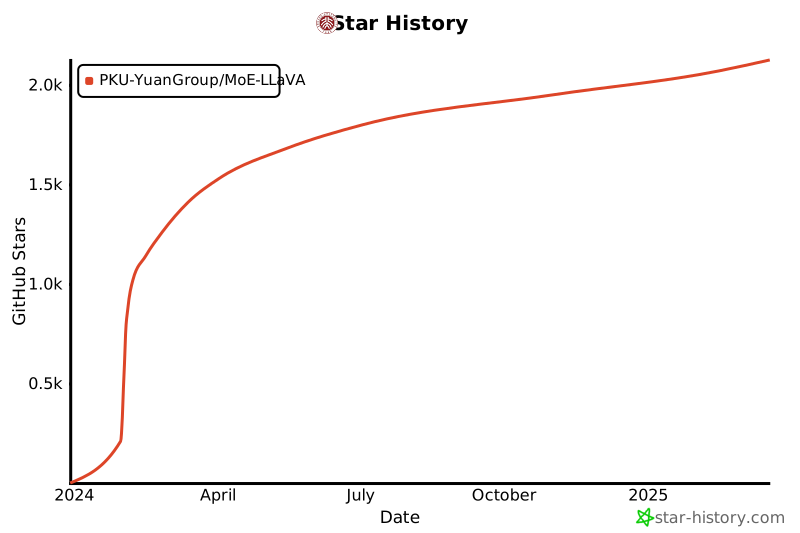](https://star-history.com/#PKU-YuanGroup/MoE-LLaVA&Date)
## 🤝 Contributors
<a href="https://github.com/PKU-YuanGroup/MoE-LLaVA/graphs/contributors">
<img src="https://contrib.rocks/image?repo=PKU-YuanGroup/MoE-LLaVA" />
</a>
提供机构:
LanguageBind
原始信息汇总
数据集概述
数据集名称
MoE-LLaVA: Mixture of Experts for Large Vision-Language Models
数据集版本
- MoE-LLaVA-1.6B×4-Top2
- MoE-LLaVA-1.8B×4-Top2
- MoE-LLaVA-2.7B×4-Top2
数据集描述
MoE-LLaVA 是一个用于多模态学习的大型视觉-语言模型,通过混合专家系统实现高性能。
数据集特点
- 高性能,但参数较少:仅使用 3B 稀疏激活参数,MoE-LLaVA 在多个视觉理解数据集上表现出色,甚至超越了 LLaVA-1.5-13B 在对象幻觉基准上的表现。
- 简单基线,多模态交互学习:通过添加一个简单的 MoE 调优阶段,可以在 8 块 V100 GPU 上在 2 天内完成 MoE-LLaVA 的训练。
数据集使用
- Gradio Web UI:推荐使用以下命令尝试 Web 演示,该演示集成了 MoE-LLaVA 的所有功能。
- CLI 推理:提供命令行接口进行模型推理。
数据集模型
| 模型 | LLM | 检查点 | 平均 | VQAv2 | GQA | VizWiz | SQA | T-VQA | POPE | MM-Bench | LLaVA-Bench-Wild | MM-Vet |
|---|---|---|---|---|---|---|---|---|---|---|---|---|
| MoE-LLaVA-1.6B×4-Top2 | 1.6B | LanguageBind/MoE-LLaVA-StableLM-1.6B-4e | 60.0 | 76.0 | 60.4 | 37.2 | 62.6 | 47.8 | 84.3 | 59.4 | 85.9 | 26.1 |
| MoE-LLaVA-1.8B×4-Top2 | 1.8B | LanguageBind/MoE-LLaVA-Qwen-1.8B-4e | 60.2 | 76.2 | 61.5 | 32.6 | 63.1 | 48.0 | 87.0 | 59.6 | 88.7 | 25.3 |
| MoE-LLaVA-2.7B×4-Top2 | 2.7B | LanguageBind/MoE-LLaVA-Phi2-2.7B-4e | 63.9 | 77.1 | 61.1 | 43.4 | 68.7 | 50.2 | 85.0 | 65.5 | 93.2 | 31.1 |
数据集要求
- Python >= 3.10
- Pytorch == 2.0.1
- CUDA Version >= 11.7
- Transformers == 4.36.2
- Tokenizers == 0.15.1
数据集训练与验证
训练与验证的说明在 TRAIN.md 和 EVAL.md 中。
数据集自定义
自定义说明在 CUSTOM.md 中。
数据集可视化
可视化说明在 VISUALIZATION.md 中。
数据集API
提供了加载模型的代码片段和运行命令。
数据集相关项目
数据集许可证
该项目主要基于 Apache 2.0 许可证发布。
数据集引用
如果发现论文和代码对研究有用,请考虑给项目加星并引用。
数据集贡献者
贡献者列表可在 GitHub 仓库中查看。



