
Cubes on conveyor belt
收藏www.kaggle.com2024-06-04 更新2025-03-24 收录
下载链接:
https://www.kaggle.com/edgeimpulse/cubes-on-conveyor-belt
下载链接
链接失效反馈官方服务:
资源简介:
This dataset has been collected by [Edge Impulse](https://edgeimpulse.com/) and used extensively to design the FOMO (Faster Objects, More Objects) object detection architecture. See [FOMO documentation](https://docs.edgeimpulse.com/docs/edge-impulse-studio/learning-blocks/object-detection/fomo-object-detection-for-constrained-devices) or the announcement [blog post](https://www.edgeimpulse.com/blog/announcing-fomo-faster-objects-more-objects/).
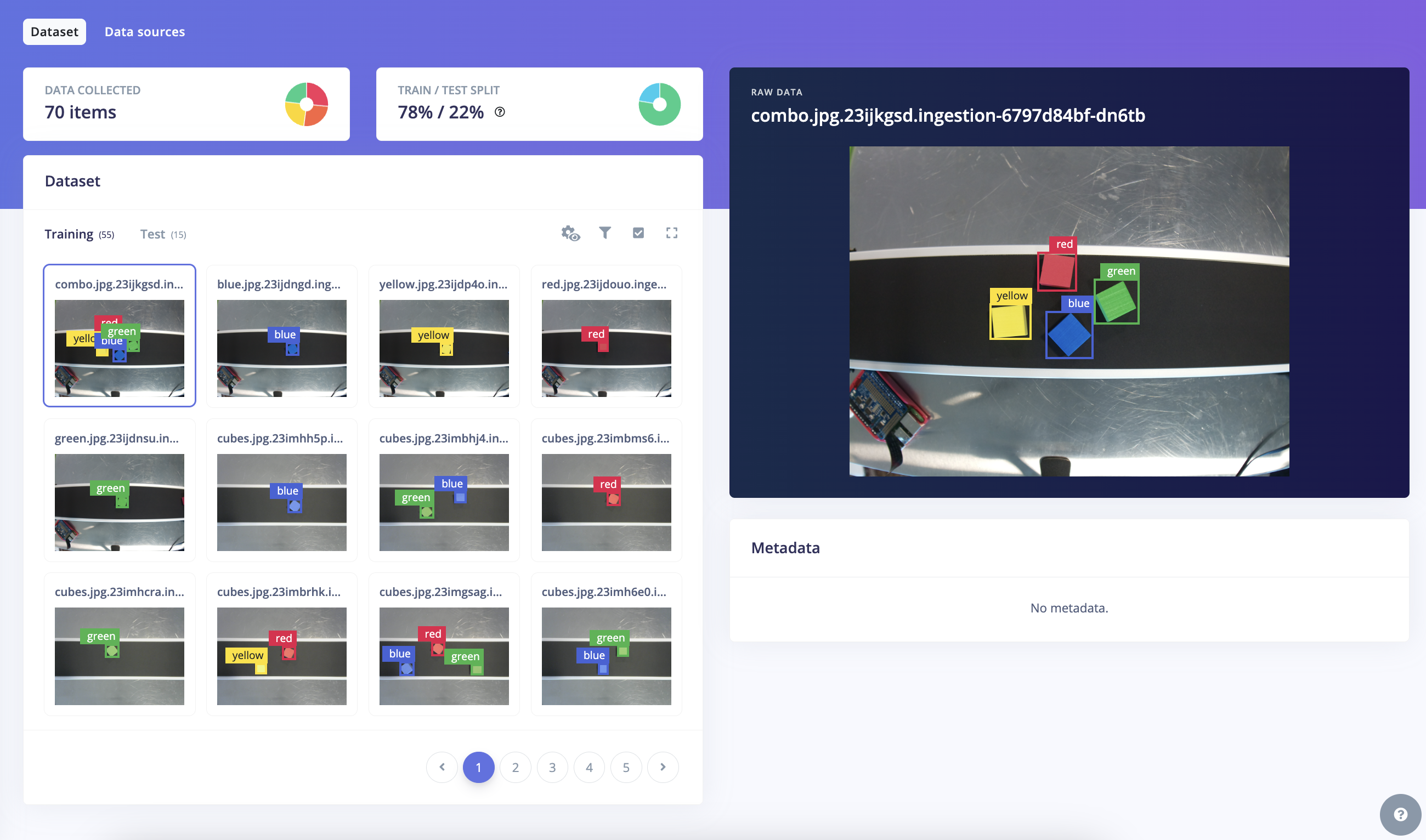
The dataset is composed of 70 images including:
- 32 blue cubes,
- 32 green cubes,
- 30 red cubes
- 28 yellow cubes
Download link: [cubes on a conveyor belt dataset](https://cdn.edgeimpulse.com/datasets/cubes\_ei-object-detection-format.zip) in Edge Impulse Object Detection format.
You can also retrieve this dataset from this [Edge Impulse public project](https://studio.edgeimpulse.com/public/230968/latest).
**Data exported from an object detection project in the Edge Impulse Studio is exported in this format, see below to understand the format.**
## How to use this dataset
To import this data into a new Edge Impulse project, either use:
- The clone button in the [Edge Impulse public project](https://studio.edgeimpulse.com/public/230968/latest)
- via the Edge Impulse Studio. Go to **Data acquisition > Upload data**.
- Or, via the Edge Impulse CLI (https://docs.edgeimpulse.com/docs/tools/edge-impulse-cli/cli-uploader), run with:
```
edge-impulse-uploader --clean --info-file info.labels
```
## Understand Edge Impulse object detection format
The Edge Impulse object detection acquisition format provides a simple and intuitive way to store images and associated bounding box labels. Folders containing data in this format will take the following structure:
```
.
├── testing
│ ├── bounding_boxes.labels
│ ├── cubes.23im33f2.jpg
│ ├── cubes.23j3rclu.jpg
│ ├── cubes.23j4jeee.jpg
│ ...
│ └── cubes.23j4k0rk.jpg
└── training
├── bounding_boxes.labels
├── blue.23ijdngd.jpg
├── combo.23ijkgsd.jpg
├── cubes.23il4pon.jpg
├── cubes.23im28tb..jpg
...
└── yellow.23ijdp4o.jpg
2 directories, 73 files
```
The subdirectories contain image files in JPEG or PNG format. Each image file represents a sample and is associated with its respective bounding box labels in the `bounding_boxes.labels` file.
The `bounding_boxes.labels` file in each subdirectory provides detailed information about the labeled objects and their corresponding bounding boxes. The file follows a JSON format, with the following structure:
* `version`: Indicates the version of the label format.
* `files`: A list of objects, where each object represents an image and its associated labels.
* `path`: The path or file name of the image.
* `category`: Indicates whether the image belongs to the training or testing set.
* (optional) `label`: Provides information about the labeled objects.
* `type`: Specifies the type of label (e.g., a single label).
* `label`: The actual label or class name of the object.
* (Optional) `metadata`: Additional metadata associated with the image, such as the site where it was collected, the timestamp or any useful information.
* `boundingBoxes`: A list of objects, where each object represents a bounding box for an object within the image.
* `label`: The label or class name of the object within the bounding box.
* `x`, `y`: The coordinates of the top-left corner of the bounding box.
* `width`, `height`: The width and height of the bounding box.
`bounding_boxes.labels` example:
```json
{
"version": 1,
"files": [
{
"path": "cubes.23im33f2.jpg",
"category": "testing",
"label": {
"type": "label",
"label": "cubes"
},
"metadata": {
"version": "2023-1234-LAB"
},
"boundingBoxes": [
{
"label": "green",
"x": 105,
"y": 201,
"width": 91,
"height": 90
},
{
"label": "blue",
"x": 283,
"y": 233,
"width": 86,
"height": 87
}
]
},
{
"path": "cubes.23j3rclu.jpg",
"category": "testing",
"label": {
"type": "label",
"label": "cubes"
},
"metadata": {
"version": "2023-4567-PROD"
},
"boundingBoxes": [
{
"label": "red",
"x": 200,
"y": 206,
"width": 74,
"height": 75
},
{
"label": "yellow",
"x": 370,
"y": 245,
"width": 79,
"height": 73
}
]
}
]
}
```
## Additional resources
A variation of this dataset has been used in the [FOMO Self-Attention article](https://www.edgeimpulse.com/blog/fomo-self-attention/)
本数据集由[Edge Impulse](https://edgeimpulse.com/)收集,并广泛用于FOMO(快速对象,更多对象)目标检测架构的设计。详见[FOMO文档](https://docs.edgeimpulse.com/docs/edge-impulse-studio/learning-blocks/object-detection/fomo-object-detection-for-constrained-devices)或相关[公告博客文章](https://www.edgeimpulse.com/blog/announcing-fomo-faster-objects-more-objects/)。
数据集由70张图像组成,包括:
- 32个蓝色立方体,
- 32个绿色立方体,
- 30个红色立方体,
- 28个黄色立方体。
数据集的下载链接为:[传送带上的立方体数据集](https://cdn.edgeimpulse.com/datasets/cubes_ei-object-detection-format.zip),格式为Edge Impulse Object Detection。
您还可以从以下[Edge Impulse公共项目](https://studio.edgeimpulse.com/public/230968/latest)检索此数据集。
**Edge Impulse Studio中目标检测项目的数据导出格式如下,详见下文了解该格式。**
## 如何使用此数据集
要将此数据导入新的Edge Impulse项目,可以使用以下方法之一:
- 在[Edge Impulse公共项目](https://studio.edgeimpulse.com/public/230968/latest)中点击克隆按钮。
- 通过Edge Impulse Studio。前往**数据采集 > 上传数据**。
- 或者,通过Edge Impulse CLI(https://docs.edgeimpulse.com/docs/tools/edge-impulse-cli/cli-uploader),运行以下命令:
edge-impulse-uploader --clean --info-file info.labels
## 理解Edge Impulse目标检测格式
Edge Impulse目标检测获取格式提供了一种简单直观的方式来存储图像及其相关的边界框标签。包含此格式数据的文件夹将采用以下结构:
.
├── testing
│ ├── bounding_boxes.labels
│ ├── cubes.23im33f2.jpg
│ ├── cubes.23j3rclu.jpg
│ ├── cubes.23j4jeee.jpg
│ ...
│ └── cubes.23j4k0rk.jpg
└── training
├── bounding_boxes.labels
├── blue.23ijdngd.jpg
├── combo.23ijkgsd.jpg
├── cubes.23il4pon.jpg
├── cubes.23im28tb..jpg
...
└── yellow.23ijdp4o.jpg
2个目录,73个文件
子目录包含JPEG或PNG格式的图像文件。每个图像文件代表一个样本,并与其对应的边界框标签在`bounding_boxes.labels`文件中相关联。
每个子目录中的`bounding_boxes.labels`文件提供了有关标记对象及其对应边界框的详细信息。该文件遵循JSON格式,具有以下结构:
* `version`:指示标签格式的版本。
* `files`:对象列表,其中每个对象代表一个图像及其相关标签。
* `path`:图像的路径或文件名。
* `category`:指示图像属于训练集还是测试集。
* (可选)`label`:提供有关标记对象的详细信息。
* `type`:指定标签类型(例如,单个标签)。
* `label`:对象的实际标签或类名。
* (可选)`metadata`:与图像相关的附加元数据,例如收集地点、时间戳或任何有用的信息。
* `boundingBoxes`:对象列表,其中每个对象代表图像中对象的边界框。
* `label`:边界框内对象的标签或类名。
* `x`,`y`:边界框左上角的坐标。
* `width`,`height`:边界框的宽度和高度。
`bounding_boxes.labels`示例:
{
"version": 1,
"files": [
{
"path": "cubes.23im33f2.jpg",
"category": "testing",
"label": {
"type": "label",
"label": "cubes"
},
"metadata": {
"version": "2023-1234-LAB"
},
"boundingBoxes": [
{
"label": "green",
"x": 105,
"y": 201,
"width": 91,
"height": 90
},
{
"label": "blue",
"x": 283,
"y": 233,
"width": 86,
"height": 87
}
]
},
{
"path": "cubes.23j3rclu.jpg",
"category": "testing",
"label": {
"type": "label",
"label": "cubes"
},
"metadata": {
"version": "2023-4567-PROD"
},
"boundingBoxes": [
{
"label": "red",
"x": 200,
"y": 206,
"width": 74,
"height": 75
},
{
"label": "yellow",
"x": 370,
"y": 245,
"width": 79,
"height": 73
}
]
}
]
}
## 其他资源
该数据集的变体已用于[FOMO Self-Attention文章](https://www.edgeimpulse.com/blog/fomo-self-attention/)。
提供机构:
Edge Impulse



