
open-image-preferences-v1-results
收藏魔搭社区2025-12-05 更新2025-07-12 收录
下载链接:
https://modelscope.cn/datasets/data-is-better-together/open-image-preferences-v1-results
下载链接
链接失效反馈官方服务:
资源简介:
# Dataset Card for image-preferences-results
<style>
.row {
display: flex;
justify-content: space-between;
width: 100%;
}
#container {
display: flex;
flex-direction: column;
font-family: Arial, sans-serif;
width: 98%
}
.prompt {
margin-bottom: 10px;
font-size: 16px;
line-height: 1.4;
color: #333;
background-color: #f8f8f8;
padding: 10px;
border-radius: 5px;
box-shadow: 0 1px 3px rgba(0,0,0,0.1);
}
.image-container {
display: flex;
gap: 10px;
}
.column {
flex: 1;
position: relative;
}
img {
max-width: 100%;
height: auto;
display: block;
}
.image-label {
position: absolute;
top: 10px;
right: 10px;
background-color: rgba(255, 255, 255, 0.7);
color: black;
padding: 5px 10px;
border-radius: 5px;
font-weight: bold;
}
</style>
<div class="row">
<div class="column">
<div id="container">
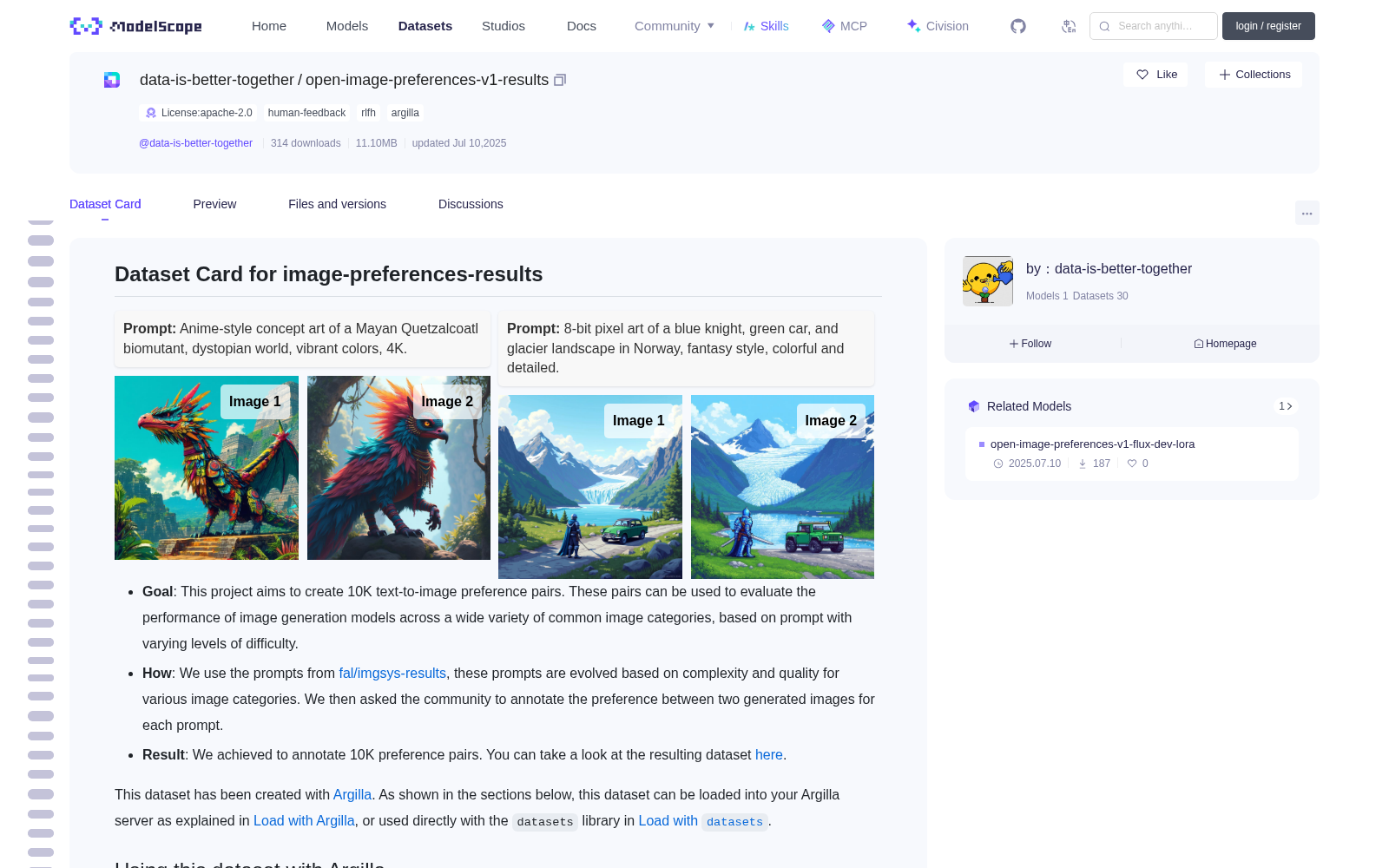
<div class="prompt"><strong>Prompt:</strong> Anime-style concept art of a Mayan Quetzalcoatl biomutant, dystopian world, vibrant colors, 4K.</div>
<div class="image-container">
<div class="column">
<img src="https://huggingface.co/datasets/data-is-better-together/open-image-preferences-v1/resolve/main/image_simplified_sd/1258.jpg">
<div class="image-label">Image 1</div>
</div>
<div class="column">
<img src="https://huggingface.co/datasets/data-is-better-together/open-image-preferences-v1/resolve/main/image_simplified_dev/1258.jpg">
<div class="image-label">Image 2</div>
</div>
</div>
</div>
</div>
<div class="column">
<div id="container">
<div class="prompt"><strong>Prompt:</strong> 8-bit pixel art of a blue knight, green car, and glacier landscape in Norway, fantasy style, colorful and detailed.</div>
<div class="image-container">
<div class="column">
<img src="https://huggingface.co/datasets/data-is-better-together/open-image-preferences-v1/resolve/main/image_simplified_dev/1210.jpg">
<div class="image-label">Image 1</div>
</div>
<div class="column">
<img src="https://huggingface.co/datasets/data-is-better-together/open-image-preferences-v1/resolve/main/image_simplified_sd/1210.jpg">
<div class="image-label">Image 2</div>
</div>
</div>
</div>
</div>
</div>
- **Goal**: This project aims to create 10K text-to-image preference pairs. These pairs can be used to evaluate the performance of image generation models across a wide variety of common image categories, based on prompt with varying levels of difficulty.
- **How**: We use the prompts from [fal/imgsys-results](https://huggingface.co/datasets/fal/imgsys-results), these prompts are evolved based on complexity and quality for various image categories. We then asked the community to annotate the preference between two generated images for each prompt.
- **Result**: We achieved to annotate 10K preference pairs. You can take a look at the resulting dataset [here](https://huggingface.co/datasets/data-is-better-together/open-image-preferences-v1-results).
This dataset has been created with [Argilla](https://github.com/argilla-io/argilla). As shown in the sections below, this dataset can be loaded into your Argilla server as explained in [Load with Argilla](#load-with-argilla), or used directly with the `datasets` library in [Load with `datasets`](#load-with-datasets).
## Using this dataset with Argilla
To load with Argilla, you'll just need to install Argilla as `pip install argilla --upgrade` and then use the following code:
```python
import argilla as rg
ds = rg.Dataset.from_hub("data-is-better-together/image-preferences-results", settings="auto")
```
This will load the settings and records from the dataset repository and push them to you Argilla server for exploration and annotation.
## Using this dataset with `datasets`
To load the records of this dataset with `datasets`, you'll just need to install `datasets` as `pip install datasets --upgrade` and then use the following code:
```python
from datasets import load_dataset
ds = load_dataset("data-is-better-together/image-preferences-results")
```
This will only load the records of the dataset, but not the Argilla settings.
## Dataset Structure
This dataset repo contains:
* Dataset records in a format compatible with HuggingFace `datasets`. These records will be loaded automatically when using `rg.Dataset.from_hub` and can be loaded independently using the `datasets` library via `load_dataset`.
* The [annotation guidelines](#annotation-guidelines) that have been used for building and curating the dataset, if they've been defined in Argilla.
* A dataset configuration folder conforming to the Argilla dataset format in `.argilla`.
The dataset is created in Argilla with: **fields**, **questions**, **suggestions**, **metadata**, **vectors**, and **guidelines**.
### Fields
The **fields** are the features or text of a dataset's records. For example, the 'text' column of a text classification dataset of the 'prompt' column of an instruction following dataset.
| Field Name | Title | Type | Required | Markdown |
| ---------- | ----- | ---- | -------- | -------- |
| images | Images | custom | True | |
### Questions
The **questions** are the questions that will be asked to the annotators. They can be of different types, such as rating, text, label_selection, multi_label_selection, or ranking.
| Question Name | Title | Type | Required | Description | Values/Labels |
| ------------- | ----- | ---- | -------- | ----------- | ------------- |
| preference | Which image is better according to prompt adherence and aesthetics? | label_selection | True | Take a look at the guidelines (bottom left corner) to get more familiar with the project examples and our community. | ['image_1', 'image_2', 'both_good', 'both_bad', 'toxic_content'] |
<!-- check length of metadata properties -->
### Metadata
The **metadata** is a dictionary that can be used to provide additional information about the dataset record.
| Metadata Name | Title | Type | Values | Visible for Annotators |
| ------------- | ----- | ---- | ------ | ---------------------- |
| model_1 | model_1 | | - | True |
| model_2 | model_2 | | - | True |
| evolution | evolution | | - | True |
### Vectors
The **vectors** contain a vector representation of the record that can be used in search.
| Vector Name | Title | Dimensions |
|-------------|-------|------------|
| prompt | prompt | [1, 256] |
### Data Instances
An example of a dataset instance in Argilla looks as follows:
```json
{
"_server_id": "c2306976-5e44-4ad4-b2ce-8a510ec6086b",
"fields": {
"images": {
"image_1": "https://huggingface.co/datasets/data-is-better-together/image-preferences-filtered/resolve/main/image_quality_dev/3368.jpg",
"image_2": "https://huggingface.co/datasets/data-is-better-together/image-preferences-filtered/resolve/main/image_quality_sd/3368.jpg",
"prompt": "a bustling manga street, devoid of vehicles, detailed with vibrant colors and dynamic line work, characters in the background adding life and movement, under a soft golden hour light, with rich textures and a lively atmosphere, high resolution, sharp focus"
}
},
"id": "3368-quality",
"metadata": {
"category": "Manga",
"evolution": "quality",
"model_1": "dev",
"model_2": "sd",
"sub_category": "detailed"
},
"responses": {
"preference": [
{
"user_id": "50b9a890-173b-4999-bffa-fc0524ba6c63",
"value": "both_good"
},
{
"user_id": "caf19767-2989-4b3c-a653-9c30afc6361d",
"value": "image_1"
},
{
"user_id": "ae3e20b2-9aeb-4165-af54-69eac3f2448b",
"value": "image_1"
}
]
},
"status": "completed",
"suggestions": {},
"vectors": {}
}
```
While the same record in HuggingFace `datasets` looks as follows:
```json
{
"_server_id": "c2306976-5e44-4ad4-b2ce-8a510ec6086b",
"category": "Manga",
"evolution": "quality",
"id": "3368-quality",
"images": {
"image_1": "https://huggingface.co/datasets/data-is-better-together/image-preferences-filtered/resolve/main/image_quality_dev/3368.jpg",
"image_2": "https://huggingface.co/datasets/data-is-better-together/image-preferences-filtered/resolve/main/image_quality_sd/3368.jpg",
"prompt": "a bustling manga street, devoid of vehicles, detailed with vibrant colors and dynamic line work, characters in the background adding life and movement, under a soft golden hour light, with rich textures and a lively atmosphere, high resolution, sharp focus"
},
"model_1": "dev",
"model_2": "sd",
"preference.responses": [
"both_good",
"image_1",
"image_1"
],
"preference.responses.status": [
"submitted",
"submitted",
"submitted"
],
"preference.responses.users": [
"50b9a890-173b-4999-bffa-fc0524ba6c63",
"caf19767-2989-4b3c-a653-9c30afc6361d",
"ae3e20b2-9aeb-4165-af54-69eac3f2448b"
],
"prompt": null,
"status": "completed",
"sub_category": "detailed"
}
```
### Data Splits
The dataset contains a single split, which is `train`.
## Dataset Creation
### Curation Rationale
[More Information Needed]
### Source Data
#### Initial Data Collection and Normalization
[More Information Needed]
#### Who are the source language producers?
[More Information Needed]
### Annotations
#### Annotation guidelines
### Image Preference Task
We are aiming to collect preferences about images. We want to know which images are best in relation to another. So that we can train an AI model to generate images like the best ones.
### Your Contribution
Your task is to answer the question “Which image adheres best to the prompt?”. The prompt describes an image with objects, attributes, and styles. The images are generations with AI models based on the prompt.
### Keyboard shortcuts
Argilla offers [keyboard shortcuts](https://docs.argilla.io/dev/how_to_guides/annotate/#shortcuts), which will smoothen your annotation experience. TLDR: You can use numbers 1-5 to assign the corresponding labels, and press ENTER to submit.
### Definition of best image
The best image should contain all attributes of the prompt and be aesthetically pleasing in relation to the prompt.
**Attributes of the prompt** include objects, their attributes, and the style of the image. For example, *a realistic photograph of a red house with a dog in front of it.* The best image should contain each of these elements.
**Aesthetically pleasing** should relate to the prompt. If the prompt states a ‘realistic image’, then the best image would be the most realistic. If the prompt stated an ‘animated image’, then the best image would show the most appealing animation.
**Ties** are possible when both images do not meet either of the above criteria. For example, one image is unpleasant and the other does not adhere to the prompt. Or, both images meet all criteria perfectly.
### Example of scenarios
Example prompt: *A realistic photograph of a red house with a dog in front of it.*
<table>
<tr>
<th>Image 1</th>
<th>Image 2</th>
</tr>
<tr>
<td>image_1</td>
<td>Image_2 contains a yellow house, whilst Image_1 adheres to the prompt.</td>
</tr>
<tr>
<td>image_1</td>
<td><strong>Image_2 is an animation</strong>, whilst Image_1 adheres to the prompt.</td>
</tr>
<tr>
<td>image_1</td>
<td>Both adhere to the prompt, but <strong>image_2 is not aesthetically pleasing</strong>.</td>
</tr>
<tr>
<td>both</td>
<td>Both images follow the prompt completely, and there is no aesthetic difference.</td>
</tr>
<tr>
<td>neither</td>
<td>Neither image follows the prompts.</td>
</tr>
<tr>
<td>neither</td>
<td>Image_2 contains all aspects mentioned in the prompt, but is not aesthetically pleasing. Image_1 does not adhere to the prompt.</td>
</tr>
<tr>
<td>Toxic ⚠️</td>
<td>Any content that is <strong>Not suitable for work.</strong> For example, sexualized or offensive images.</td>
</tr>
</table>
### Socials, leaderboards and discussions
This is a community event so discussion and sharing are encouraged. We are available in the [#data-is-better-together channel on the Hugging Face discord](https://discord.com/channels/879548962464493619/1205128865735770142), on [@argilla_io on X](https://x.com/argilla_io) and as [@Argilla LinkedIn](https://www.linkedin.com/company/11501021/admin/dashboard/) too. Lastly, you can follow [our Hugging Face organisation](https://huggingface.co/data-is-better-together) and we've got a [progress leaderboard](https://huggingface.co/spaces/data-is-better-together/image-preferences-leaderboard) that will be used for prices.
#### Annotation process
[More Information Needed]
#### Who are the annotators?
[More Information Needed]
### Personal and Sensitive Information
[More Information Needed]
## Considerations for Using the Data
### Social Impact of Dataset
[More Information Needed]
### Discussion of Biases
[More Information Needed]
### Other Known Limitations
[More Information Needed]
## Additional Information
### Dataset Curators
[More Information Needed]
### Licensing Information
[More Information Needed]
### Citation Information
[More Information Needed]
### Contributions
[More Information Needed]
# 图像偏好结果数据集卡片(Dataset Card for image-preferences-results)
<style>
.row {
display: flex;
justify-content: space-between;
width: 100%;
}
#container {
display: flex;
flex-direction: column;
font-family: Arial, sans-serif;
width: 98%
}
.prompt {
margin-bottom: 10px;
font-size: 16px;
line-height: 1.4;
color: #333;
background-color: #f8f8f8;
padding: 10px;
border-radius: 5px;
box-shadow: 0 1px 3px rgba(0,0,0,0.1);
}
.image-container {
display: flex;
gap: 10px;
}
.column {
flex: 1;
position: relative;
}
img {
max-width: 100%;
height: auto;
display: block;
}
.image-label {
position: absolute;
top: 10px;
right: 10px;
background-color: rgba(255, 255, 255, 0.7);
color: black;
padding: 5px 10px;
border-radius: 5px;
font-weight: bold;
}
</style>
<div class="row">
<div class="column">
<div id="container">
<div class="prompt"><strong>提示词(Prompt):</strong> 玛雅羽蛇神生物改造体的动漫风格概念艺术,反乌托邦世界,色彩鲜艳,4K分辨率。</div>
<div class="image-container">
<div class="column">
<img src="https://huggingface.co/datasets/data-is-better-together/open-image-preferences-v1/resolve/main/image_simplified_sd/1258.jpg">
<div class="image-label">图像1</div>
</div>
<div class="column">
<img src="https://huggingface.co/datasets/data-is-better-together/open-image-preferences-v1/resolve/main/image_simplified_dev/1258.jpg">
<div class="image-label">图像2</div>
</div>
</div>
</div>
</div>
<div class="column">
<div id="container">
<div class="prompt"><strong>提示词(Prompt):</strong> 8位像素艺术风格的蓝色骑士、绿色汽车与挪威冰川景观,奇幻风格,色彩丰富且细节饱满。</div>
<div class="image-container">
<div class="column">
<img src="https://huggingface.co/datasets/data-is-better-together/open-image-preferences-v1/resolve/main/image_simplified_dev/1210.jpg">
<div class="image-label">图像1</div>
</div>
<div class="column">
<img src="https://huggingface.co/datasets/data-is-better-together/open-image-preferences-v1/resolve/main/image_simplified_sd/1210.jpg">
<div class="image-label">图像2</div>
</div>
</div>
</div>
</div>
</div>
- **目标(Goal)**: 本项目旨在构建10000组文本到图像偏好配对。此类配对可基于不同难度等级的提示词,用于评估图像生成模型在各类常见图像类别上的表现。
- **实现方式(How)**: 我们从[fal/imgsys-results](https://huggingface.co/datasets/fal/imgsys-results)获取提示词,这些提示词针对各类图像类别,基于复杂度与质量进行了优化演进。随后我们邀请社区标注人员为每个提示词对应的两张AI生成图像标注偏好等级。
- **成果(Result)**: 我们已完成10000组偏好配对的标注。你可以通过[此链接](https://huggingface.co/datasets/data-is-better-together/open-image-preferences-v1-results)查看最终数据集。
本数据集由[Argilla](https://github.com/argilla-io/argilla)开发。如下文所述,你可以按照[使用Argilla加载](#load-with-argilla)中的说明将该数据集加载到你的Argilla服务器中,也可以通过[使用datasets库加载](#load-with-datasets)中介绍的`datasets`库直接使用。
## 使用Argilla加载此数据集
要使用Argilla加载,只需先执行`pip install argilla --upgrade`安装Argilla,然后运行以下代码:
python
import argilla as rg
ds = rg.Dataset.from_hub("data-is-better-together/image-preferences-results", settings="auto")
此操作将从数据集仓库加载配置与记录,并推送至你的Argilla服务器,以便进行探索与标注。
## 使用datasets库加载此数据集
要使用`datasets`库加载此数据集的记录,只需先执行`pip install datasets --upgrade`安装`datasets`库,然后运行以下代码:
python
from datasets import load_dataset
ds = load_dataset("data-is-better-together/image-preferences-results")
此操作仅会加载数据集的记录,不会加载Argilla相关配置。
## 数据集结构
本数据集仓库包含:
* 兼容Hugging Face `datasets`格式的数据集记录。使用`rg.Dataset.from_hub`时会自动加载此类记录,也可通过`datasets`库的`load_dataset`函数独立加载。
* 用于构建与整理数据集的[标注指南](#annotation-guidelines)(若已在Argilla中定义)。
* 符合Argilla数据集格式的`.argilla`数据集配置文件夹。
本数据集在Argilla中基于以下内容创建:**字段(fields)**、**问题(questions)**、**建议(suggestions)**、**元数据(metadata)**、**向量(vectors)**与**指南(guidelines)**。
### 字段(Fields)
字段即数据集记录的特征或文本内容。例如,文本分类数据集的“text”列,或指令跟随数据集的“prompt”列。
| 字段名 | 标题 | 类型 | 必填 | Markdown支持 |
| ---------- | ----- | ---- | -------- | -------- |
| images | 图像 | 自定义 | 是 | |
### 问题(Questions)
问题即向标注人员提出的查询,可分为多种类型,如评分、文本、标签选择、多标签选择或排序。
| 问题名 | 标题 | 类型 | 必填 | 描述 | 可选值/标签 |
| ------------- | ----- | ---- | -------- | ----------- | ------------- |
| preference | 依据提示词贴合度与美学效果,哪张图像更优秀? | 标签选择 | 是 | 请查看指南(左下角)以熟悉本项目示例与社区规则。 | ['image_1', 'image_2', 'both_good', 'both_bad', 'toxic_content'] |
### 元数据(Metadata)
元数据是用于提供数据集记录额外信息的字典。
| 元数据名称 | 标题 | 类型 | 可选值 | 对标注人员可见 |
| ------------- | ----- | ---- | ------ | ---------------------- |
| model_1 | model_1 | | - | 是 |
| model_2 | model_2 | | - | 是 |
| evolution | evolution | | - | 是 |
### 向量(Vectors)
向量包含可用于搜索的记录向量表示。
| 向量名 | 标题 | 维度 |
|-------------|-------|------------|
| prompt | 提示词 | [1, 256] |
### 数据实例
Argilla中的数据集记录示例如下:
json
{
"_server_id": "c2306976-5e44-4ad4-b2ce-8a510ec6086b",
"fields": {
"images": {
"image_1": "https://huggingface.co/datasets/data-is-better-together/image-preferences-filtered/resolve/main/image_quality_dev/3368.jpg",
"image_2": "https://huggingface.co/datasets/data-is-better-together/image-preferences-filtered/resolve/main/image_quality_sd/3368.jpg",
"prompt": "一条繁忙的漫画风格街道,无车辆通行,色彩鲜艳且线条灵动,背景中的角色增添了生机与动感,沐浴在柔和的黄金时刻光线中,质感丰富且氛围活泼,高分辨率,清晰对焦"
}
},
"id": "3368-quality",
"metadata": {
"category": "漫画",
"evolution": "质量",
"model_1": "dev",
"model_2": "sd",
"sub_category": "细节丰富"
},
"responses": {
"preference": [
{
"user_id": "50b9a890-173b-4999-bffa-fc0524ba6c63",
"value": "both_good"
},
{
"user_id": "caf19767-2989-4b3c-a653-9c30afc6361d",
"value": "image_1"
},
{
"user_id": "ae3e20b2-9aeb-4165-af54-69eac3f2448b",
"value": "image_1"
}
]
},
"status": "已完成",
"suggestions": {},
"vectors": {}
}
而在Hugging Face `datasets`库中的同一条记录示例如下:
json
{
"_server_id": "c2306976-5e44-4ad4-b2ce-8a510ec6086b",
"category": "漫画",
"evolution": "质量",
"id": "3368-quality",
"images": {
"image_1": "https://huggingface.co/datasets/data-is-better-together/image-preferences-filtered/resolve/main/image_quality_dev/3368.jpg",
"image_2": "https://huggingface.co/datasets/data-is-better-together/image-preferences-filtered/resolve/main/image_quality_sd/3368.jpg",
"prompt": "一条繁忙的漫画风格街道,无车辆通行,色彩鲜艳且线条灵动,背景中的角色增添了生机与动感,沐浴在柔和的黄金时刻光线中,质感丰富且氛围活泼,高分辨率,清晰对焦"
},
"model_1": "dev",
"model_2": "sd",
"preference.responses": [
"both_good",
"image_1",
"image_1"
],
"preference.responses.status": [
"已提交",
"已提交",
"已提交"
],
"preference.responses.users": [
"50b9a890-173b-4999-bffa-fc0524ba6c63",
"caf19767-2989-4b3c-a653-9c30afc6361d",
"ae3e20b2-9aeb-4165-af54-69eac3f2448b"
],
"prompt": null,
"status": "已完成",
"sub_category": "细节丰富"
}
### 数据拆分
本数据集仅包含一个拆分:`train`(训练集)。
## 数据集创建
### 整理依据
[需补充更多信息]
### 源数据
#### 初始数据收集与标准化
[需补充更多信息]
#### 源语言生产者是谁?
[需补充更多信息]
### 标注
#### 标注指南
##### 图像偏好标注任务
我们旨在收集图像的偏好信息,以明确不同图像间的优劣对比,从而训练AI模型生成更优质的图像。
##### 你的任务
你的任务是回答“哪张图像最贴合提示词?”。提示词描述了包含特定对象、属性与风格的图像,而两张图像均为基于该提示词由AI模型生成的结果。
##### 键盘快捷键
Argilla提供[键盘快捷键](https://docs.argilla.io/dev/how_to_guides/annotate/#shortcuts),可优化你的标注体验。简而言之:你可以使用数字1-5分配对应的标签,按下回车键提交标注。
##### 最优图像的定义
最优图像应同时满足两点:一是完整包含提示词中的所有属性,二是相对于该提示词具有良好的美学效果。
- **提示词属性**:包括对象、其属性与图像风格。例如,“一张红色房屋前有一只狗的写实照片”,最优图像应包含所有上述元素。
- **美学效果**:需与提示词匹配。若提示词要求“写实图像”,则最优图像应为写实程度最高的作品;若提示词要求“动画风格图像”,则最优图像应为最具吸引力的动画效果作品。
- **平局情况**:当两张图像均不满足上述任一标准时可判定为平局。例如,一张图像观感不佳,另一张未贴合提示词;或两张图像均完美符合提示词且无美学差异。
##### 场景示例
示例提示词:*一张红色房屋前有一只狗的写实照片。*
<table>
<tr>
<th>图像1</th>
<th>图像2</th>
</tr>
<tr>
<td>图像1</td>
<td>图像2的房屋为黄色,而图像1贴合提示词要求。</td>
</tr>
<tr>
<td>图像1</td>
<td><strong>图像2为动画风格</strong>,而图像1贴合提示词要求。</td>
</tr>
<tr>
<td>图像1</td>
<td>两张图像均贴合提示词,但<strong>图像2美学效果不佳</strong>。</td>
</tr>
<tr>
<td>两者皆优</td>
<td>两张图像均完全符合提示词,且无美学差异。</td>
</tr>
<tr>
<td>两者皆差</td>
<td>两张图像均未贴合提示词。</td>
</tr>
<tr>
<td>两者皆差</td>
<td>图像2包含提示词中的所有元素,但美学效果不佳;图像1未贴合提示词。</td>
</tr>
<tr>
<td>有毒内容 ⚠️</td>
<td>任何<strong>不适合公开传播的内容</strong>。例如,色情或冒犯性图像。</td>
</tr>
</table>
##### 社群、排行榜与讨论
本活动面向社区,鼓励讨论与分享。你可以通过以下渠道联系我们:Hugging Face Discord的[#data-is-better-together频道](https://discord.com/channels/879548962464493619/1205128865735770142)、X平台的[@argilla_io](https://x.com/argilla_io)、LinkedIn的[@Argilla](https://www.linkedin.com/company/11501021/admin/dashboard/)。此外,你可以关注[我们的Hugging Face组织](https://huggingface.co/data-is-better-together),并查看[进度排行榜](https://huggingface.co/spaces/data-is-better-together/image-preferences-leaderboard),该排行榜将用于评选获奖者。
#### 标注流程
[需补充更多信息]
#### 标注人员是谁?
[需补充更多信息]
### 个人与敏感信息
[需补充更多信息]
## 数据使用注意事项
### 数据集的社会影响
[需补充更多信息]
### 偏差讨论
[需补充更多信息]
### 其他已知限制
[需补充更多信息]
## 附加信息
### 数据集整理者
[需补充更多信息]
### 授权信息
[需补充更多信息]
### 引用信息
[需补充更多信息]
### 贡献者
[需补充更多信息]
提供机构:
maas创建时间:
2025-07-10
搜集汇总
数据集介绍
背景与挑战
背景概述
该数据集旨在创建10K个文本到图像的偏好对,用于评估图像生成模型在不同难度提示下的性能。它基于社区对两个生成图像的偏好标注,并可通过Argilla或HuggingFace datasets库加载使用。
以上内容由遇见数据集搜集并总结生成


