
MultiCamVideo-Dataset
收藏魔搭社区2025-12-05 更新2025-09-06 收录
下载链接:
https://modelscope.cn/datasets/KwaiVGI/MultiCamVideo-Dataset
下载链接
链接失效反馈官方服务:
资源简介:
[Github](https://github.com/KwaiVGI/ReCamMaster)
[Project Page](https://jianhongbai.github.io/ReCamMaster/)
[Paper](https://arxiv.org/abs/2503.11647)
## 📷 MultiCamVideo Dataset
### 1. Dataset Introduction
**TL;DR:** The MultiCamVideo Dataset, introduced in [ReCamMaster](https://arxiv.org/abs/2503.11647), is a multi-camera synchronized video dataset rendered using Unreal Engine 5. It includes synchronized multi-camera videos and their corresponding camera trajectories. The MultiCamVideo Dataset can be valuable in fields such as camera-controlled video generation, synchronized video production, and 3D/4D reconstruction.
<div align="center">
<video controls autoplay style="width: 70%;" src="https://cdn-uploads.huggingface.co/production/uploads/6530bf50f145530101ec03a2/r-cc03Z6b5v_X5pkZbIZR.mp4"></video>
</div>
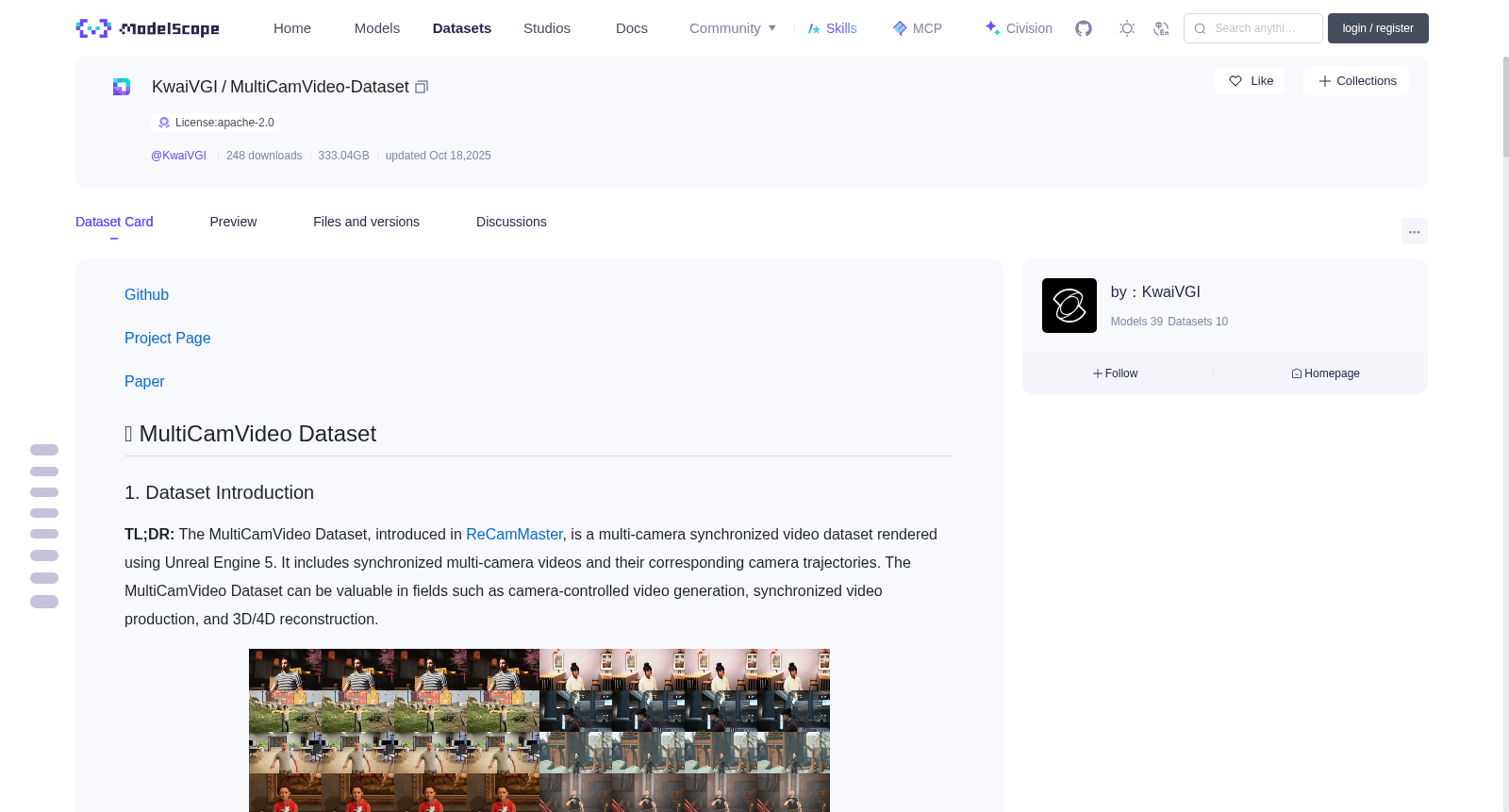
The MultiCamVideo Dataset is a multi-camera synchronized video dataset rendered using Unreal Engine 5. It includes synchronized multi-camera videos and their corresponding camera trajectories.
It consists of 13.6K different dynamic scenes, each captured by 10 cameras, resulting in a total of 136K videos and 112K different camera trajectories. Each dynamic scene is composed of four elements: {3D environment, character, animation, camera}. Specifically, we use animation to drive the character
and position the animated character within the 3D environment. Then, Time-synchronized cameras are set up to move along predefined trajectories to render the multi-camera video data.
<p align="center">
<img src="https://cdn-uploads.huggingface.co/production/uploads/6530bf50f145530101ec03a2/Ea0Feqy7uBTLczyPal-CE.png" alt="Example Image" width="70%">
</p>
**3D Environment:** We collect 37 high-quality 3D environments assets from [Fab](https://www.fab.com). To minimize the domain gap between rendered data and real-world videos, we primarily select visually realistic 3D scenes, while choosing a few stylized or surreal 3D scenes as a supplement. To ensure data diversity, the selected scenes cover a variety of indoor and outdoor settings, such as city streets, shopping malls, cafes, office rooms, and the countryside.
**Character:** We collect 66 different human 3D models as characters from [Fab](https://www.fab.com) and [Mixamo](https://www.mixamo.com).
**Animation:** We collect 93 different animations from [Fab](https://www.fab.com) and [Mixamo](https://www.mixamo.com), including common actions such as waving, dancing, and cheering. We use these animations to drive the collected characters and create diverse datasets through various combinations.
**Camera:** To ensure camera movements are diverse and closely resemble real-world distributions, we create a wide range of camera trajectories and parameters to cover various situations. To achieve this by designing rules to batch-generate random camera starting positions and movement trajectories:
1. Camera Starting Position.
We take the character's position as the center of a hemisphere with a radius of {3m, 5m, 7m, 10m} based on the size of the 3D scene and randomly sample within this range as the camera's starting point, ensuring the closest distance to the character is greater than 0.5m and the pitch angle is within 45 degrees.
2. Camera Trajectories.
- **Pan & Tilt**:
The camera rotation angles are randomly selected within the range, with pan angles ranging from 5 to 45 degrees and tilt angles ranging from 5 to 30 degrees, with directions randomly chosen left/right or up/down.
- **Basic Translation**:
The camera translates along the positive and negative directions of the xyz axes, with movement distances randomly selected within the range of \\([\frac{1}{4}, 1] \times\\) distance2character.
- **Basic Arc Trajectory**:
The camera moves along an arc, with rotation angles randomly selected within the range of 15 to 75 degrees.
- **Random Trajectories**:
1-3 points are sampled in space, and the camera moves from the initial position through these points as the movement trajectory, with the total movement distance randomly selected within the range of \\([\frac{1}{4}, 1] \times\\) distance2character. The polyline is smoothed to make the movement more natural.
- **Static Camera**:
The camera does not translate or rotate during shooting, maintaining a fixed position.
3. Camera Movement Speed.
To further enhance the diversity of trajectories, 50% of the training data uses constant-speed camera trajectories, while the other 50% uses variable-speed trajectories generated by nonlinear functions. Consider a camera trajectory with a total of \\(f\\) frames, starting at location \\(L_{start}\\) and ending at position \\(L_{end}\\). The location at the \\(i\\)-th frame is given by:
\\(L_i = L_{start} + (L_{end} - L_{start}) \cdot \left( \frac{1 - \exp(-a \cdot i/f)}{1 - \exp(-a)} \right),\\)
where \\(a\\) is an adjustable parameter to control the trajectory speed. When \\(a > 0\\), the trajectory starts fast and then slows down; when \\(a < 0\\), the trajectory starts slow and then speeds up. The larger the absolute value of \\(a\\), the more drastic the change.
4. Camera Parameters.
We chose four set of camera parameters: {focal=18mm, aperture=10}, {focal=24mm, aperture=5}, {focal=35mm, aperture=2.4} and {focal=50mm, aperture=2.4}.
### 2. Statistics and Configurations
Dataset Statistics:
| Number of Dynamic Scenes | Camera per Scene | Total Videos |
|:------------------------:|:----------------:|:------------:|
| 13,600 | 10 | 136,000 |
Video Configurations:
| Resolution | Frame Number | FPS |
|:-----------:|:------------:|:------------------------:|
| 1280x1280 | 81 | 15 |
Note: You can use 'center crop' to adjust the video's aspect ratio to fit your video generation model, such as 16:9, 9:16, 4:3, or 3:4.
Camera Configurations:
| Focal Length | Aperture | Sensor Height | Sensor Width |
|:-----------------------:|:------------------:|:-------------:|:------------:|
| 18mm, 24mm, 35mm, 50mm | 10.0, 5.0, 2.4 | 23.76mm | 23.76mm |
### 3. File Structure
```
MultiCamVideo-Dataset
├── train
│ ├── f18_aperture10
│ │ ├── scene1 # one dynamic scene
│ │ │ ├── videos
│ │ │ │ ├── cam01.mp4 # synchronized 81-frame videos at 1280x1280 resolution
│ │ │ │ ├── cam02.mp4
│ │ │ │ ├── ...
│ │ │ │ └── cam10.mp4
│ │ │ └── cameras
│ │ │ └── camera_extrinsics.json # 81-frame camera extrinsics of the 10 cameras
│ │ ├── ...
│ │ └── scene3400
│ ├── f24_aperture5
│ │ ├── scene1
│ │ ├── ...
│ │ └── scene3400
│ ├── f35_aperture2.4
│ │ ├── scene1
│ │ ├── ...
│ │ └── scene3400
│ └── f50_aperture2.4
│ ├── scene1
│ ├── ...
│ └── scene3400
└── val
└── 10basic_trajectories
├── videos
│ ├── cam01.mp4 # example videos corresponding to the validation cameras
│ ├── cam02.mp4
│ ├── ...
│ └── cam10.mp4
└── cameras
└── camera_extrinsics.json # 10 different trajectories for validation
```
### 4. Useful scripts
- Data Extraction
```bash
sudo apt-get install git-lfs
git lfs install
git clone https://huggingface.co/datasets/KwaiVGI/MultiCamVideo-Dataset
cat MultiCamVideo-Dataset.part* > MultiCamVideo-Dataset.tar.gz
tar -xvf MultiCamVideo-Dataset.tar.gz
```
- Camera Visualization
```python
python vis_cam.py
```
The visualization script is modified from [CameraCtrl](https://github.com/hehao13/CameraCtrl/blob/main/tools/visualize_trajectory.py), thanks for their inspiring work.
<p align="center">
<img src="https://cdn-uploads.huggingface.co/production/uploads/6530bf50f145530101ec03a2/q5whL09UsZnrtD4xO9EbR.png" alt="Example Image" width="40%">
</p>
## Citation
If you found this dataset useful, please cite our [paper](https://arxiv.org/abs/2503.11647).
```bibtex
@misc{bai2025recammaster,
title={ReCamMaster: Camera-Controlled Generative Rendering from A Single Video},
author={Jianhong Bai and Menghan Xia and Xiao Fu and Xintao Wang and Lianrui Mu and Jinwen Cao and Zuozhu Liu and Haoji Hu and Xiang Bai and Pengfei Wan and Di Zhang},
year={2025},
eprint={2503.11647},
archivePrefix={arXiv},
primaryClass={cs.CV},
url={https://arxiv.org/abs/2503.11647},
}
```
## Contact
[jianghongbai@zju.edu.cn](jianghongbai@zju.edu.cn)
# Acknowledgments
We thank Jinwen Cao, Yisong Guo, Haowen Ji, Jichao Wang, and Yi Wang from Kuaishou Technology for their invaluable help in constructing the MultiCamVideo Dataset.
[Github仓库](https://github.com/KwaiVGI/ReCamMaster)
[项目主页](https://jianhongbai.github.io/ReCamMaster/)
[论文](https://arxiv.org/abs/2503.11647)
## 📷 多相机视频数据集(MultiCamVideo Dataset)
### 1. 数据集简介
**核心要点(TL;DR):** 本多相机视频数据集(MultiCamVideo Dataset)由论文[ReCamMaster](https://arxiv.org/abs/2503.11647)提出,是一款基于虚幻引擎5(Unreal Engine 5)渲染的多相机同步视频数据集,包含同步多相机视频及其对应的相机轨迹,可应用于相机控制视频生成、同步视频制作、3D/4D重建等多个研究领域。
<div align="center">
<video controls autoplay style="width: 70%;" src="https://cdn-uploads.huggingface.co/production/uploads/6530bf50f145530101ec03a2/r-cc03Z6b5v_X5pkZbIZR.mp4"></video>
</div>
本数据集为基于虚幻引擎5渲染的多相机同步视频数据集,包含同步多相机视频及其对应的相机轨迹。数据集共包含13600个不同的动态场景,每个场景由10台相机采集,总计生成136000段视频与112000条不同的相机轨迹。每个动态场景由四大要素构成:三维环境、角色、动画与相机。具体而言,我们通过动画驱动角色,并将动画后的角色放置于三维环境中;随后部署时间同步的相机,使其沿预定义轨迹运动,从而渲染得到多相机视频数据。
<p align="center">
<img src="https://cdn-uploads.huggingface.co/production/uploads/6530bf50f145530101ec03a2/Ea0Feqy7uBTLczyPal-CE.png" alt="示例图像" width="70%"></p>
**三维环境:** 我们从[Fab](https://www.fab.com)平台采集了37个高质量三维环境资源。为缩小渲染数据与真实世界视频之间的域间隙,我们优先选取视觉效果逼真的三维场景,并辅以少量风格化或超现实的三维场景。为保证数据多样性,所选场景涵盖多种室内外场景,包括城市街道、购物中心、咖啡馆、办公室与乡村等。
**角色:** 我们从[Fab](https://www.fab.com)与[Mixamo](https://www.mixamo.com)平台采集了66个不同的人类三维模型作为角色。
**动画:** 我们从上述平台采集了93种不同的动画,涵盖挥手、跳舞、欢呼等常见动作。我们通过这些动画驱动采集得到的角色,并通过多种组合方式构建多样化的数据集。
**相机:** 为保证相机运动具备多样性且贴合真实世界的分布规律,我们设计了大量相机轨迹与参数以覆盖各类场景。我们通过制定规则批量生成随机相机初始位置与运动轨迹,具体如下:
1. 相机初始位置
我们以角色位置为中心,根据三维场景的尺寸选取半径为3m、5m、7m、10m的半球区域,并在该区域内随机采样作为相机的初始位置,确保相机与角色的最小距离大于0.5m,且俯仰角处于45度范围内。
2. 相机轨迹
- **水平摇摄与俯仰旋转:** 相机旋转角度在指定范围内随机选取:水平摇摄角度范围为5至45度,俯仰角度范围为5至30度,旋转方向随机选择左/右或上/下。
- **基础平移:** 相机沿xyz轴的正负方向平移,移动距离在`[frac{1}{4}, 1] imes 与角色的距离`范围内随机选取。
- **基础圆弧轨迹:** 相机沿圆弧轨迹运动,旋转角度在15至75度范围内随机选取。
- **随机轨迹:** 在空间中采样1至3个点,相机从初始位置出发,途经这些点完成运动轨迹,总移动距离在`[frac{1}{4}, 1] imes 与角色的距离`范围内随机选取。为使运动更自然,我们对该折线进行平滑处理。
- **静止相机:** 相机在拍摄过程中不进行平移或旋转,保持固定位置。
3. 相机运动速度
为进一步提升轨迹多样性,50%的训练数据采用匀速相机轨迹,剩余50%采用由非线性函数生成的变速轨迹。以总帧数为(f)的相机轨迹为例,其初始位置为(L_{start}),终止位置为(L_{end}),第(i)帧的位置由下式计算:
(L_i = L_{start} + (L_{end} - L_{start}) cdot left( frac{1 - exp(-a cdot i/f)}{1 - exp(-a)}
ight),)
其中(a)为用于控制轨迹速度的可调参数。当(a>0)时,轨迹先快后慢;当(a<0)时,轨迹先慢后快;(a)的绝对值越大,速度变化越剧烈。
4. 相机参数
我们选取了四组相机参数:{焦距=18mm,光圈=10}、{焦距=24mm,光圈=5}、{焦距=35mm,光圈=2.4}以及{焦距=50mm,光圈=2.4}。
### 2. 统计信息与配置参数
**数据集统计信息:**
| 动态场景数量 | 单场景相机数 | 总视频数 |
|:------------------------:|:----------------:|:------------:|
| 13,600 | 10 | 136,000 |
**视频配置参数:**
| 分辨率 | 帧数 | 帧率 |
|:-----------:|:------------:|:------------------------:|
| 1280x1280 | 81 | 15 |
注:你可通过“中心裁剪(center crop)”调整视频的宽高比,以适配你的视频生成模型,例如16:9、9:16、4:3或3:4。
**相机配置参数:**
| 焦距 | 光圈 | 传感器高度 | 传感器宽度 |
|:-----------------------:|:------------------:|:-------------:|:------------:|
| 18mm, 24mm, 35mm, 50mm | 10.0, 5.0, 2.4 | 23.76mm | 23.76mm |
### 3. 文件结构
MultiCamVideo-Dataset
├── train
│ ├── f18_aperture10
│ │ ├── scene1 # 单个动态场景
│ │ │ ├── videos
│ │ │ │ ├── cam01.mp4 # 分辨率为1280x1280的81帧同步视频
│ │ │ │ ├── cam02.mp4
│ │ │ │ ├── ...
│ │ │ │ └── cam10.mp4
│ │ │ └── cameras
│ │ │ └── camera_extrinsics.json # 10台相机的81帧相机外参
│ │ ├── ...
│ │ └── scene3400
│ ├── f24_aperture5
│ │ ├── scene1
│ │ ├── ...
│ │ └── scene3400
│ ├── f35_aperture2.4
│ │ ├── scene1
│ │ ├── ...
│ │ └── scene3400
│ └── f50_aperture2.4
│ ├── scene1
│ ├── ...
│ └── scene3400
└── val
└── 10basic_trajectories
├── videos
│ ├── cam01.mp4 # 验证相机对应的示例视频
│ ├── cam02.mp4
│ ├── ...
│ └── cam10.mp4
└── cameras
└── camera_extrinsics.json # 用于验证的10条不同轨迹
### 4. 实用脚本
- 数据提取
bash
sudo apt-get install git-lfs
git lfs install
git clone https://huggingface.co/datasets/KwaiVGI/MultiCamVideo-Dataset
cat MultiCamVideo-Dataset.part* > MultiCamVideo-Dataset.tar.gz
tar -xvf MultiCamVideo-Dataset.tar.gz
- 相机可视化
python
python vis_cam.py
本可视化脚本改编自[CameraCtrl](https://github.com/hehao13/CameraCtrl/blob/main/tools/visualize_trajectory.py),在此感谢其极具启发性的工作。
<p align="center">
<img src="https://cdn-uploads.huggingface.co/production/uploads/6530bf50f145530101ec03a2/q5whL09UsZnrtD4xO9EbR.png" alt="示例图像" width="40%"></p>
## 引用
若您认为本数据集对您的研究有所帮助,请引用我们的[论文](https://arxiv.org/abs/2503.11647)。
bibtex
@misc{bai2025recammaster,
title={ReCamMaster: Camera-Controlled Generative Rendering from A Single Video},
author={Jianhong Bai and Menghan Xia and Xiao Fu and Xintao Wang and Lianrui Mu and Jinwen Cao and Zuozhu Liu and Haoji Hu and Xiang Bai and Pengfei Wan and Di Zhang},
year={2025},
eprint={2503.11647},
archivePrefix={arXiv},
primaryClass={cs.CV},
url={https://arxiv.org/abs/2503.11647},
}
## 联系方式
[jianghongbai@zju.edu.cn](jianghongbai@zju.edu.cn)
## 致谢
我们感谢来自快手科技的Jinwen Cao、Yisong Guo、Haowen Ji、Jichao Wang与Yi Wang在构建本数据集过程中提供的宝贵帮助。
提供机构:
maas
创建时间:
2025-09-05
搜集汇总
数据集介绍
背景与挑战
背景概述
MultiCamVideo-Dataset是一个多摄像头同步视频数据集,包含13,600个动态场景,每个场景由10个摄像头捕获,总计136,000个视频。数据集通过Unreal Engine 5渲染,支持摄像头控制的视频生成和3D/4D重建等应用。
以上内容由遇见数据集搜集并总结生成



