
IDEA-Bench
收藏魔搭社区2025-12-05 更新2024-12-14 收录
下载链接:
https://modelscope.cn/datasets/AI-ModelScope/IDEA-Bench
下载链接
链接失效反馈官方服务:
资源简介:
## Dataset Description
<p align="center">
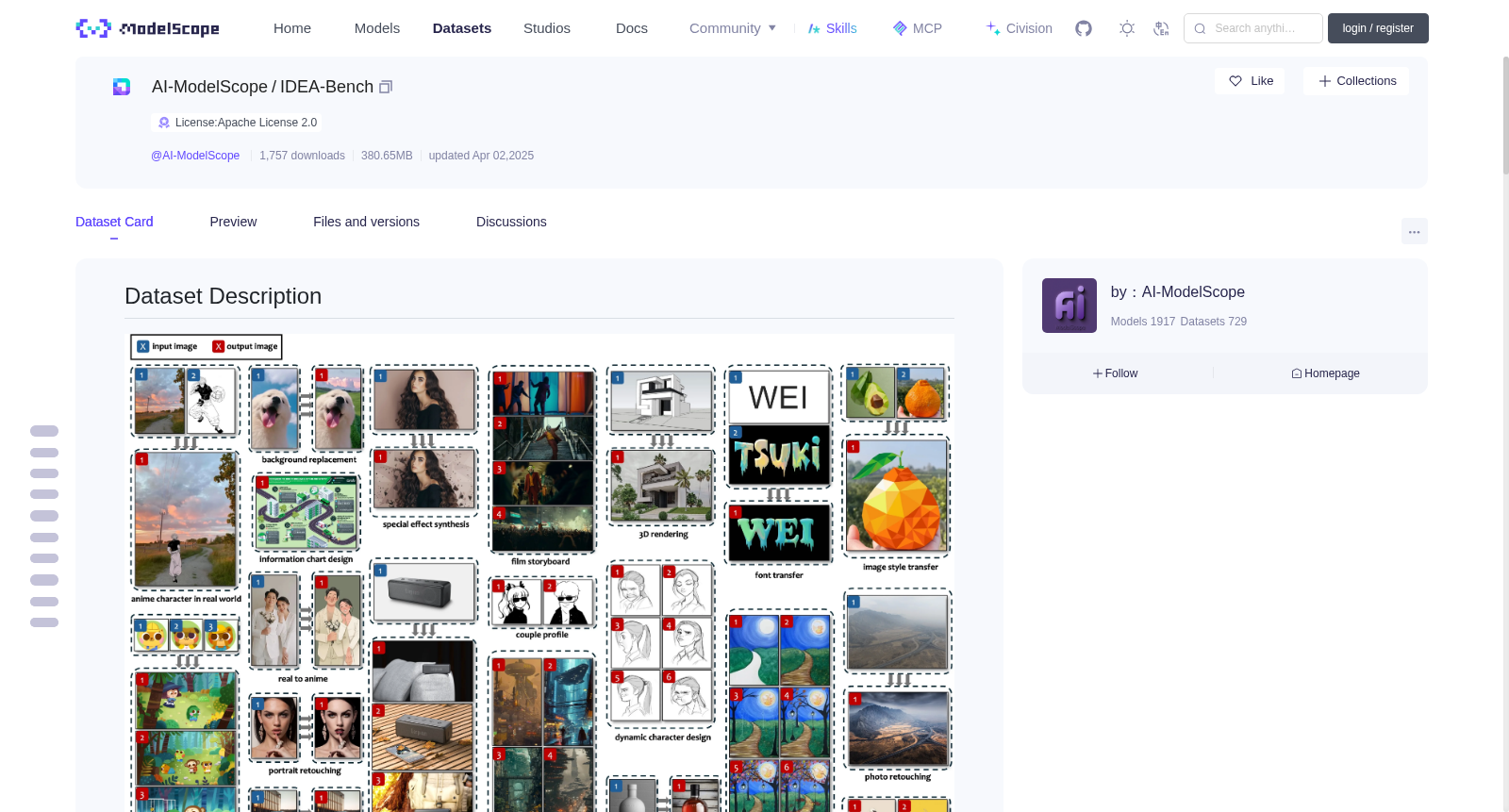
<img src="https://img.alicdn.com/imgextra/i1/O1CN01OCdAMv1xOpJDMJRo1_!!6000000006434-0-tps-4345-2809.jpg" width="100%" height="100%">
</p>
- **Homepage:** [https://ali-vilab.github.io/IDEA-Bench-Page](https://ali-vilab.github.io/IDEA-Bench-Page)
- **Repository:** [https://github.com/ali-vilab/IDEA-Bench](https://github.com/ali-vilab/IDEA-Bench)
- **Paper:** [https://arxiv.org/abs/2412.11767](https://arxiv.org/abs/2412.11767)
- **Arena:** [https://huggingface.co/spaces/ali-vilab/IDEA-Bench-Arena](https://huggingface.co/spaces/ali-vilab/IDEA-Bench-Arena)
### Dataset Overview
IDEA-Bench is a comprehensive benchmark designed to evaluate generative models' performance in professional design tasks. It includes **100** carefully selected tasks across five categories: text-to-image, image-to-image, images-to-image, text-to-images, and image(s)-to-images. These tasks encompass a wide range of applications, including storyboarding, visual effects, photo retouching, and more.
IDEA-Bench provides a robust framework for assessing models' capabilities through **275** test cases and **1,650** detailed evaluation criteria, aiming to bridge the gap between current generative model capabilities and professional-grade requirements.
### Supported Tasks
The dataset supports the following tasks:
- Text-to-Image generation
- Image-to-Image transformation
- Images-to-Image synthesis
- Text-to-Images generation
- Image(s)-to-Images generation
### Use Cases
IDEA-Bench is designed for evaluating generative models in professional-grade image design, testing capabilities such as consistency, contextual relevance, and multimodal integration. It is suitable for benchmarking advancements in text-to-image models, image editing tools, and general-purpose generative systems.
## Dataset Format and Structure
### Data Organization
The dataset is structured into **275** subdirectories, with each subdirectory representing a unique evaluation case. Each subdirectory contains the following components:
1. **`instruction.txt`**
A plain text file containing the prompt used for generating images in the evaluation case.
2. **`meta.json`**
A JSON file providing metadata about the specific evaluation case. The structure of `meta.json` is as follows:
```json
{
"task_name": "special effect adding",
"num_of_cases": 3,
"image_reference": true,
"multi_image_reference": true,
"multi_image_output": false,
"uid": "0085",
"output_image_count": 1,
"case_id": "0001"
}
```
- task_name: Name of the task.
- num_of_cases: The number of individual cases in the task.
- image_reference: Indicates if the task involves input reference images (true or false).
- multi_image_reference: Specifies if the task involves multiple input images (true or false).
- multi_image_output: Specifies if the task generates multiple output images (true or false).
- uid: Unique identifier for the task.
- output_image_count: Number of images expected as output.
- case_id: Identifier for this case.
3. **`Image Files`**
Optional .jpg files named in sequence (e.g., 0001.jpg, 0002.jpg) representing the input images for the case. Some cases may not include image files.
4. **`eval.json`**
A JSON file containing six evaluation questions, along with detailed scoring criteria. Example format:
```json
{
"questions": [
{
"question": "Does the output image contain circular background elements similar to the second input image?",
"0_point_standard": "The output image does not have circular background elements, or the background shape significantly deviates from the circular structure in the second input image.",
"1_point_standard": "The output image contains a circular background element located behind the main subject's head, similar to the visual structure of the second input image. This circular element complements the subject's position, enhancing the composition effect."
},
{
"question": "Is the visual style of the output image consistent with the stylized effect in the second input image?",
"0_point_standard": "The output image lacks the stylized graphic effects of the second input image, retaining too much photographic detail or having inconsistent visual effects.",
"1_point_standard": "The output image adopts a graphic, simplified color style similar to the second input image, featuring bold, flat color areas with minimal shadow effects."
},
...
]
}
```
- Each question includes:
- question: The evaluation query.
- 0_point_standard: Criteria for assigning a score of 0.
- 1_point_standard: Criteria for assigning a score of 1.
5. **`auto_eval.jsonl`**
Some subdirectories contain an `auto_eval.jsonl` file. This file is part of a subset specifically designed for automated evaluation using multimodal large language models (MLLMs). Each prompt in the file has been meticulously refined by annotators to ensure high quality and detail, enabling precise and reliable automated assessments.
### Example case structure
For a task “special effect adding” with UID 0085, the folder structure may look like this:
```
special_effect_adding_0001/
├── 0001.jpg
├── 0002.jpg
├── 0003.jpg
├── instruction.txt
├── meta.json
├── eval.json
├── auto_eval.jsonl
```
## Evaluation
### Human Evaluation
The evaluation process for IDEA-Bench includes a rigorous human scoring system. Each case is assessed based on the corresponding `eval.json` file in its subdirectory. The file contains six binary evaluation questions, each with clearly defined 0-point and 1-point standards. The scoring process follows a hierarchical structure:
1. **Hierarchical Scoring**:
- If either Question 1 or Question 2 receives a score of 0, the remaining four questions (Questions 3–6) are automatically scored as 0.
- Similarly, if either Question 3 or Question 4 receives a score of 0, the last two questions (Questions 5 and 6) are scored as 0.
2. **Task-Level Scores**:
- Scores for cases sharing the same `uid` are averaged to calculate the task score.
3. **Category and Final Scores**:
- Certain tasks are grouped under professional-level categories, and their scores are consolidated as described in `task_split.json`.
- Final scores for the five major categories are obtained by averaging the task scores within each category.
- The overall model score is computed as the average of the five major category scores.
Scripts for score computation will be provided soon to streamline this process.
### MLLM Evaluation
The automated evaluation leverages multimodal large language models (MLLMs) to assess a subset of cases equipped with finely tuned prompts in the `auto_eval.jsonl` files. These prompts have been meticulously refined by annotators to ensure detailed and accurate assessments. MLLMs evaluate the model outputs by interpreting the detailed questions and criteria provided in these prompts.
Further details about the MLLM evaluation process can be found in the [IDEA-Bench GitHub repository](https://github.com/ali-vilab/IDEA-Bench). The repository includes additional resources and instructions for implementing automated evaluations.
These two complementary evaluation methods ensure that IDEA-Bench provides a comprehensive framework for assessing both human-aligned quality and automated model performance in professional-grade image generation tasks.
## 数据集描述
<p align="center">
<img src="https://img.alicdn.com/imgextra/i1/O1CN01OCdAMv1xOpJDMJRo1_!!6000000006434-0-tps-4345-2809.jpg" width="100%" height="100%">
</p>
- **主页:** [https://ali-vilab.github.io/IDEA-Bench-Page](https://ali-vilab.github.io/IDEA-Bench-Page)
- **代码仓库:** [https://github.com/ali-vilab/IDEA-Bench](https://github.com/ali-vilab/IDEA-Bench)
- **论文:** [https://arxiv.org/abs/2412.11767](https://arxiv.org/abs/2412.11767)
- **评测竞技场:** [https://huggingface.co/spaces/ali-vilab/IDEA-Bench-Arena](https://huggingface.co/spaces/ali-vilab/IDEA-Bench-Arena)
### 数据集概览
IDEA-Bench是一款用于评估生成式模型(Generative Model)在专业设计任务中表现的综合性基准测试集。其涵盖五大类共100个精心遴选的任务,包括文本到图像生成(Text-to-Image generation)、图像到图像转换(Image-to-Image transformation)、多图像到图像合成(Images-to-Image synthesis)、文本到多图像生成(Text-to-Images generation)以及多图像到多图像生成(Image(s)-to-Images generation)。这些任务覆盖故事板制作、视觉特效、照片修图等广泛应用场景。
IDEA-Bench通过275个测试用例与1650条详细的评估准则构建了一套稳健的评测框架,旨在缩小当前生成式模型的性能与专业级需求之间的差距。
### 支持任务
本数据集支持以下任务:
- 文本到图像生成(Text-to-Image generation)
- 图像到图像转换(Image-to-Image transformation)
- 多图像到图像合成(Images-to-Image synthesis)
- 文本到多图像生成(Text-to-Images generation)
- 多图像到多图像生成(Image(s)-to-Images generation)
### 应用场景
IDEA-Bench专为专业级图像设计场景下的生成式模型评测而设计,可测试模型的一致性、上下文关联性、多模态融合等能力,适用于文本到图像模型、图像编辑工具以及通用生成式系统的性能基准测试。
## 数据集格式与结构
### 数据组织
本数据集共包含275个子目录,每个子目录对应一个独立的评测用例。每个子目录包含以下组件:
1. **`instruction.txt`**:纯文本文件,存储该评测用例的图像生成提示词(prompt)。
2. **`meta.json`**:存储该评测用例元数据的JSON文件,其结构示例如下:
json
{
"task_name": "special effect adding",
"num_of_cases": 3,
"image_reference": true,
"multi_image_reference": true,
"multi_image_output": false,
"uid": "0085",
"output_image_count": 1,
"case_id": "0001"
}
各字段说明如下:
- `task_name`:任务名称
- `num_of_cases`:该任务下的独立用例数量
- `image_reference`:标识该任务是否需要输入参考图像(`true`为是,`false`为否)
- `multi_image_reference`:标识该任务是否需要多幅输入参考图像
- `multi_image_output`:标识该任务是否生成多幅输出图像
- `uid`:任务唯一标识符
- `output_image_count`:预期输出的图像数量
- `case_id`:该评测用例的标识符
3. **`Image Files`**:可选的按顺序命名的`.jpg`格式图像文件(例如`0001.jpg`、`0002.jpg`),代表该用例的输入图像。部分用例可能不包含图像文件。
4. **`eval.json`**:包含6个评估问题及详细评分准则的JSON文件,示例格式如下:
json
{
"questions": [
{
"question": "Does the output image contain circular background elements similar to the second input image?",
"0_point_standard": "The output image does not have circular background elements, or the background shape significantly deviates from the circular structure in the second input image.",
"1_point_standard": "The output image contains a circular background element located behind the main subject's head, similar to the visual structure of the second input image. This circular element complements the subject's position, enhancing the composition effect."
},
{
"question": "Is the visual style of the output image consistent with the stylized effect in the second input image?",
"0_point_standard": "The output image lacks the stylized graphic effects of the second input image, retaining too much photographic detail or having inconsistent visual effects.",
"1_point_standard": "The output image adopts a graphic, simplified color style similar to the second input image, featuring bold, flat color areas with minimal shadow effects."
},
...
]
}
各评估问题包含以下字段:
- `question`:评估查询问题
- `0_point_standard`:得0分的评判标准
- `1_point_standard`:得1分的评判标准
5. **`auto_eval.jsonl`**:部分子目录包含该文件,属于专为多模态大语言模型(Multimodal Large Language Model, MLLM)自动化评测设计的子集。文件中的每条提示词均由标注人员精心打磨,确保高质量与细节完整性,可实现精准可靠的自动化评估。
### 示例用例结构
以任务“添加特效”(UID为0085)为例,其文件夹结构可能如下:
special_effect_adding_0001/
├── 0001.jpg
├── 0002.jpg
├── 0003.jpg
├── instruction.txt
├── meta.json
├── eval.json
├── auto_eval.jsonl
## 评测方式
### 人工评测
IDEA-Bench的评测流程包含严格的人工评分体系。每个用例均依据其对应子目录中的`eval.json`文件进行评估,该文件包含6个二元评估问题,每个问题均明确规定了0分与1分的评判标准。评分流程遵循层级规则:
1. **层级评分规则**:
- 若问题1或问题2得分为0,则其余4个问题(问题3至问题6)自动计为0分。
- 同理,若问题3或问题4得分为0,则最后两个问题(问题5与问题6)自动计为0分。
2. **任务级评分**:将同一`uid`下的所有用例得分取平均,得到该任务的评分。
3. **类别与最终评分**:
- 部分任务会按专业类别进行分组,其评分将按照`task_split.json`中的规则进行整合。
- 五大类别的最终得分通过计算该类别内所有任务评分的平均值得到。
- 模型的整体得分则为五大类别得分的平均值。
评分计算脚本将在后续发布,以简化评测流程。
### 多模态大语言模型自动化评测
自动化评测依托多模态大语言模型(MLLM),针对`auto_eval.jsonl`文件中包含微调提示词的子集用例开展评估。文件中的提示词均由标注人员精心打磨,确保具备足够的细节与准确性,MLLM可通过解读这些提示词中的详细问题与评判标准对模型输出进行评估。
关于MLLM评测流程的更多细节可查阅[IDEA-Bench GitHub代码仓库](https://github.com/ali-vilab/IDEA-Bench),该仓库包含自动化评测所需的额外资源与操作指南。
这两种互补的评测方法确保了IDEA-Bench可为专业级图像生成任务中的人工对齐质量与自动化模型性能评估提供全面的评测框架。
提供机构:
maas
创建时间:
2025-04-02
搜集汇总
数据集介绍
背景与挑战
背景概述
IDEA-Bench是一个用于评估生成模型在专业设计任务中性能的综合性基准测试数据集,包含100个任务、275个测试案例和1,650个详细评估标准,覆盖文本到图像、图像到图像等多种生成类别。数据集结构清晰,每个案例提供指令、元数据、图像和评估文件,并支持人工和自动评估方法,旨在弥合当前模型能力与专业级需求之间的差距。
以上内容由遇见数据集搜集并总结生成



